BLUETTI Elite 300 Portable Power Station (ASIN B0GT3SNGJM)
Best Power Station Buying Guide — Black Friday Deals 2026
A power station choice starts with the job you want it to do: keep a few devices connected, provide a larger reserve for an outage, or serve a setup that uses RV-style connections. The listed models span those priorities, from the Jackery Explorer 300’s 292Wh capacity to larger-capacity options from DJI and BLUETTI. Their output figures and ports also differ, so capacity alone is not a complete shortlist. During Black Friday, compare the exact model and included components shown in the offer with the specifications that matter to you; no promotion or bundle should be assumed from the season.
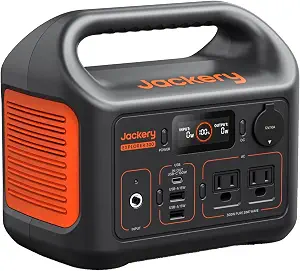
Jackery Portable Power Station Explorer 300 (ASIN B082TMBYR6)
Best Budget: The Jackery Portable Power Station Explorer 300 is the compact-capacity choice in this group, with 292Wh capacity and 300W rated output, plus 600W peak surge. Those figures give you a starting point for checking whether the devices you plan to connect fit the station’s stated capacity and output. They do not establish how long a particular device will run; that depends on the device and conditions, so avoid treating the capacity figure as a guaranteed runtime.
Its connection mix is specific and easy to compare with a personal device list: two AC outlets, a 100W USB-C PD port, two USB-A ports, and a 120W car port. If your planned setup relies on those connection types, the list may suit a smaller, mixed-device arrangement. Check the labels and power requirements of your own gear rather than assuming that a port count alone settles compatibility. The supplied components are an AC adapter, a car charger cable, and a user guide.
The Best Budget label is an editorial fit for shoppers who want to consider the lower-capacity option in this selection, not a claim about its current price or a market-wide award. It may be worth keeping on a Black Friday shortlist when your needs are modest and the listed outlets match your plans. If you expect a larger reserve or higher output, assess the other choices instead of stretching this model beyond its stated figures. Before purchasing, confirm the exact Explorer 300 listing and included items; Black Friday promotions can vary by offer, and no particular discount or bundle is established here.
Key specs
Capacity
292Wh capacity
Rated output
300W rated output (600W peak surge)
Ports
2 AC outlets, a 100W USB-C PD port, 2 USB-A ports, and a 120W car port.
Included accessories
1*AC adapter, 1* car charger cable, 1* user guide
DJI Power 2000 Portable Power Station, 2048Wh LFP Battery
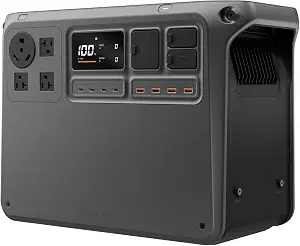
DJI Power 2000 Portable Power Station, 2048Wh LFP Battery (ASIN B0FBRD1B8C)
Best Overall: The DJI Power 2000 combines a 2048Wh LFP battery with 3000 watts of output. For a shopper planning around a broader household backup role, those figures make it a useful central option to evaluate against the actual devices and loads involved. Capacity describes stored energy, while output is a separate limit to check against what you intend to connect. Neither figure alone promises a particular runtime, so make a device-by-device plan before relying on it for an outage.
The listing specifies 15 ports, including dual full SDC ports, and says the unit can run as low as 30 dB. It also gives a 10 ms UPS switch time. These details may be relevant if your plan involves multiple connections, noise considerations, or a device arrangement where UPS switching matters. They do not, by themselves, establish suitability for every device or setting; verify the requirements and instructions for the equipment you intend to use. The stated included components are the DJI Power 2000 and a DJI Power AC Power Cable.
Its listed expandable capacity reaches 22.5kWh with expansion batteries, which are sold separately. That makes Best for Expandable Backup a distinct editorial label for this model: the feature gives shoppers a path to consider a larger reserve, but expansion requires additional purchases. The Best Overall label is likewise a choice among the products in this guide, not proof of measured superiority. During Black Friday, compare the exact offer and whether it identifies the base unit or an expansion configuration. Check the included components and separate-battery requirement before treating an advertised setup as the one you will receive.
Key specs
Battery capacity
2048Wh LFP battery
Output wattage
3000 watts
Noise level
runs as low as 30 dB
UPS switch time
10 ms [11] switch time
Ports
15 ports including dual full SDC ports
Expandable capacity
supports expansion up to 22.5kWh*—enough to power essential home devices for 4–6 days during blackouts, storms, or off-grid living. * Requires expansion batteries, which are sold separately.
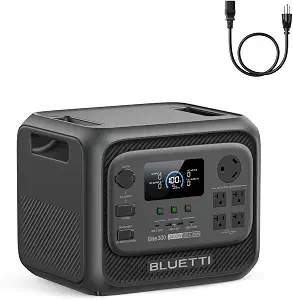
BLUETTI Elite 300 Portable Power Station (ASIN B0GT3SNGJM)
Best for RV-Focused Setups: The BLUETTI Elite 300 lists a 3014.4Wh capacity and a 3014Wh LiFePO4 battery, along with 2400W AC output and 4800W surge power. Those are useful figures to compare with a planned load, especially if you are deciding whether the station’s stated output aligns with the equipment you hope to connect. Capacity and output answer different questions, and neither guarantees a particular operating duration. Work from the specifications of your devices rather than estimating from the station’s headline capacity alone.
The RV-specific connection detail is a TT-30 RV port, accompanied by 12V/30A DC. That is the basis for this guide’s Best for RV-Focused Setups label: it gives an RV shopper a directly relevant connection to investigate, not a blanket assurance of compatibility with every RV system. Check your equipment’s connection and electrical requirements before purchase. The unit also lists a 10ms UPS switch, which may matter to shoppers considering a setup where UPS switching is part of their plan; confirm the intended use against the product information.
The stated dimensions are 14.4″L x 12″W x 11.7″H, and the listed weight is 58 pounds. Use those exact figures when considering where you would place the unit and how its size and weight fit your handling plans. The listing also specifies a LiFePO4 battery with 6000+ cycles; retain that stated qualification rather than treating it as a guarantee of service life in every use pattern. For Black Friday, inspect the exact Elite 300 listing and included configuration, then decide whether its capacity, output, RV port, dimensions, and weight suit your own priorities.
Key specs
Capacity
3014.4Wh
Battery
3014Wh LiFePO4 Battery with 6000+ Cycles
Output
2400W AC and 4800W Surge Power
RV outputs
TT-30 RV port & 12V/30A DC
UPS
10ms UPS switch
Dimensions
14.4″L x 12″W x 11.7″H
Weight
58 pounds
Translate your routine into a power plan
Write down what you would actually connect and when: perhaps a few personal devices during a short interruption, or a broader group of essential equipment during a longer one. Then find each device’s power requirement and consider whether it would run at the same time as the others. The product figures here are starting points, not runtime promises. A capacity number does not tell you how long an unspecified device will operate, and an output rating does not prove that every combination of loads will work.
Use that list to separate must-haves from conveniences. If your priorities center on a smaller set of connections and a 292Wh capacity, the Jackery provides one profile to examine. A larger planned reserve may make the DJI or BLUETTI figures more relevant, while the BLUETTI’s RV port may be a key item for an RV-oriented plan. This is a way to organize your own requirements, not a measured ranking of performance.
During Black Friday, keep the device list beside the listing as you compare offers. Verify the model name and the configuration represented by the offer, then match its published details against your intended loads. If a listing does not give you enough information to answer a compatibility question, do not fill in the gap with an assumption. Look for the needed product detail before making the decision.
Separate stored energy from operating limits
Capacity and output are related to different parts of a purchase decision. Capacity indicates the stated amount of stored energy, while output gives a stated power figure to compare with the equipment you want to use. Consider both, and do not let a large capacity number stand in for checking output. The Explorer 300 lists 292Wh and 300W rated output, with 600W peak surge; the DJI lists a 2048Wh battery and 3000 watts; the Elite 300 lists 3014.4Wh and 2400W AC output, with 4800W surge power.
Treat the wording around each number carefully. A rated-output figure and a peak or surge figure are not interchangeable descriptions. If a device has a startup demand or another specific requirement, check the product information and your device documentation for a match rather than assuming a surge figure resolves every question. Likewise, none of these capacity values supplies a guaranteed runtime for an unnamed device.
A practical comparison sheet can have separate spaces for the devices’ requirements, the station’s stated capacity, and its output details. Fill in what the listings actually say and mark unresolved questions. On Black Friday, this helps you compare an exact offer without letting a headline specification or seasonal framing substitute for the limits that matter to your setup.
Choose connections for the equipment you own
Make a connection inventory before choosing a port count. Note whether your planned devices call for AC outlets, USB-C PD, USB-A, a car connection, an RV port, or another listed interface. Then compare those needs with the exact port descriptions. The Explorer 300 provides two AC outlets, a 100W USB-C PD port, two USB-A ports, and a 120W car port. The DJI lists 15 ports, including dual full SDC ports, while the BLUETTI specifies a TT-30 RV port and 12V/30A DC.
A total number of ports cannot tell you on its own whether the particular mix suits your devices. Similarly, the presence of a named connector is a reason to check your device’s requirements, not proof that every related setup is compatible. Keep connector type and power requirements together in your notes; both can affect whether a connection is appropriate.
For an RV-centered plan, give the Elite 300’s TT-30 port close attention and verify your own RV requirements. For a mixed small-device plan, inspect the Jackery’s stated USB and AC options. For a larger number of connections, the DJI’s listed port count may merit a closer look, while its port types still need to match your gear. Black Friday listings should be checked for the exact model and configuration rather than judged from a generic product image or a broad description.
Decide whether backup switching or expansion matters
Some shoppers are choosing a station for occasional use; others are planning for equipment that they would prefer to keep connected through a power interruption. If UPS switching is relevant to your plan, the DJI lists a 10 ms switch time and the BLUETTI lists a 10ms UPS switch. Check the product details and the requirements of the equipment involved before relying on this information for a particular use. A listed switch time does not, by itself, establish suitability for every device or setup.
Think separately about whether you might want to expand capacity later. The DJI listing specifies support for expansion up to 22.5kWh, with expansion batteries sold separately. That gives you a concrete configuration detail to weigh, while also making clear that the larger capacity requires additional batteries. Do not treat the expanded figure as the included capacity of the base unit.
If neither UPS switching nor expansion is part of your plan, those details may be less important than port fit, output, or placement. If they are priorities, write down what you need to verify before buying. During Black Friday, check whether the offer is for the base station or includes an expanded configuration, and confirm the included items rather than assuming accessories or batteries are part of a promotion.
Make room, handling, and offer details part of the choice
A station also has to fit the place and routine you have in mind. The BLUETTI listing provides dimensions of 14.4″L x 12″W x 11.7″H and a weight of 58 pounds. Use those exact figures to think through your intended storage spot and handling needs. The provided information does not give dimensions or weight for the other models, so compare those details on their own listings if they matter to you rather than guessing from a product name or capacity.
Review the included components too. The Explorer 300 lists an AC adapter, car charger cable, and user guide. The DJI includes the Power 2000 and an AC Power Cable. These are the specified items; do not assume other accessories are included unless the exact offer says so. The provided facts do not specify included components for the BLUETTI, so check its listing if that affects your plans.
Black Friday can make offer comparison feel urgent, but the useful check is still specific: confirm the model, configuration, and included items shown on the offer, and make sure they correspond to the product you intended to evaluate. Do not assume that a seasonal listing means a particular discount, bundle, or inventory situation. Make the purchase decision from verified offer details and the product facts that fit your own needs.
Make your Black Friday choice
The right shortlist depends on what you want to power, which connections your gear needs, and how much capacity or output your plan calls for. The Explorer 300 offers a defined smaller-capacity profile; the DJI adds stated expansion and UPS details; and the Elite 300 puts an RV port alongside its capacity, output, size, and weight figures. Treat those distinctions as decision points, not guarantees about your results. Before checking out during Black Friday, confirm the exact offer and included configuration, then choose the model whose verified specifications best fit your own plan.