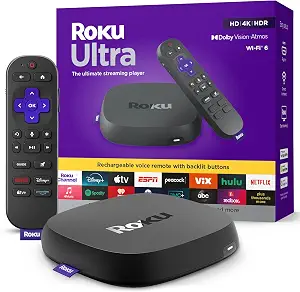
Choosing the Roku Ultra for Black Friday starts with a useful question: which of its listed features would change how you watch or control your TV? The product combines 3840 x 2160 pixels video resolution, HDR10+ and Dolby Vision picture formats, Dolby Atmos audio, direct headphone pairing, and a rechargeable voice remote with several convenience features. That is a broad set of considerations, but it does not mean every feature needs to be a priority for every household. Use this guide to identify the details that fit your routine, then compare the exact Black Friday offer and package before deciding.
The Roku Ultra is worth considering if you want to weigh picture formats, audio format, remote controls, and personal-listening options together rather than choosing around one feature alone. Its listing specifies 3840 x 2160 pixels video resolution, HDR10+ and Dolby Vision, and Dolby Atmos. Those details give shoppers concrete points to check against their own viewing plans and equipment. They are not a promise that every program or setup will use every format, so think about what you watch and the devices involved before making the formats central to a Black Friday purchase.
The included Roku Voice Remote Pro (2nd edition) is rechargeable and has backlit buttons, hands-free voice controls, and a lost remote finder. You can also pair favorite headphones directly to the Roku Ultra, and the package lists USB-C charging for the remote. Together, these details may matter to someone who values remote convenience or wants a personal-listening option. For Black Friday, treat the Roku Ultra as a feature match, not an automatic bargain: check that the offer describes the same product and included items you intend to buy.
Will the picture details matter in your viewing routine?
The listed video resolution is 3840 x 2160 pixels, with HDR10+ and Dolby Vision picture formats. Before Black Friday, ask whether those specifications are relevant to the display and content sources you plan to use. If you already pay attention to picture formats, the named formats give you specific details to compare with your setup. If you mainly want a straightforward streaming player and do not use format information to guide purchases, you may decide those details are less important than the remote or headphone option.
Avoid treating a format name as a guarantee about every title you watch. Instead, use the listing as a prompt to check the programs and equipment that matter to you. That makes the decision more personal than simply choosing the longest specification list. During Black Friday shopping, compare this exact model and offer with your priorities, rather than assuming that a deal headline tells you how much value the picture features will add to your own viewing.
Black Friday offer details deserve a closer look
A Black Friday price or promotion should not distract from confirming what is actually being offered. Check that the product description identifies the Roku Ultra and that the listed package matches the included items: a Roku Ultra streaming player, Roku Voice Remote Pro (2nd edition), and USB-C charging for the remote. The provided listing does not establish what any particular seller’s offer will contain, so use the offer details in front of you rather than assuming that every listing has the same bundle or terms.
It also helps to decide what you would buy at the offer shown before comparing it with other options. Are the picture formats important to you? Will you use direct headphone pairing? Do the remote controls sound useful in your routine? This self-check can keep Black Friday browsing focused on features you value, without relying on an unverified discount, stock claim, or sense of urgency. Compare the exact product variant and package description, then decide whether the stated offer fits your needs.
Choose remote features based on how you use a controller
The rechargeable Roku Voice Remote Pro (2nd edition) has backlit buttons, hands-free voice controls, and a lost remote finder. Each feature suggests a different reason to care: you might value illuminated buttons when you are navigating in a dim room, prefer hands-free voice controls, or want the option to use a remote finder when the remote is misplaced. These are practical questions to ask yourself, not proof that one remote is right for everyone.
Consider the whole routine. If you often search by voice or tend to set a remote down in different places, the listed controls may carry more weight for you than picture-format details. If you rarely use voice features, those controls may not influence your decision as much. For a Black Friday purchase, confirm the offer includes this remote version rather than inferring its contents from a product name alone. The listing specifies that the remote is rechargeable and that USB-C charging for it is included.
Decide whether direct headphone pairing fits your listening
The Roku Ultra listing says you can pair your favorite headphones directly to the player. That gives shoppers who want a personal-listening option a clear feature to consider. Think about when you would use it: perhaps you sometimes prefer headphones for viewing, or want to keep the option available even if it is not part of your everyday routine. The provided details do not specify a pairing method or other headphone requirements, so check any compatibility questions that matter to you before purchase.
This feature may be more decisive for one household than another. If direct headphone pairing is a priority, place it near the top of your Black Friday checklist and verify that the offer is for the Roku Ultra described here. If you do not expect to use headphones with the player, you can give greater weight to the remote or listed picture and audio formats. Either way, base the choice on how you expect to use the feature rather than assuming that its presence alone makes the device a better fit.
Black Friday audio decisions start with your setup
Dolby Atmos is the listed audio format. Treat that as a useful specification to investigate, not as a guarantee about how every program will sound in your particular setup. Consider whether the content you plan to watch and the audio equipment you use make the format relevant to your decision. If you are unsure, check the requirements for the other parts of your setup before making Atmos a deciding factor; those details are not specified in the product facts provided here.
For Black Friday, compare audio priorities alongside the other features instead of letting a format label decide the purchase by itself. A shopper who cares most about remote convenience may reach a different conclusion from someone focused on audio formats or headphone pairing. The useful question is not whether Dolby Atmos sounds impressive on a listing, but whether its inclusion matches something you plan to use. That self-assessment helps you judge the exact offer without assuming a performance result or a particular equipment match.
Use the package contents to plan what arrives
The listed package contains the Roku Ultra streaming player, Roku Voice Remote Pro (2nd edition), and USB-C charging for the remote. That information helps you set expectations about the named included items. In particular, the charging detail is identified as being for the remote; do not read it as a statement about other accessories or assume that unlisted items are included. If a specific item is important to your setup, look for it explicitly in the offer details before checking out.
This is a small but worthwhile step when comparing Black Friday listings, where shoppers may move quickly between product pages. Match the product name and package description, and note any differences between the offer you are considering and the contents listed here. The facts provided do not describe seller policies or every possible bundle, so rely on the specific listing for those points. A careful package check can prevent you from choosing based on an assumption instead of the actual offer.
Key specs
Video resolution
3840 x 2160 pixels
Picture formats
HDR10+, Dolby Vision
Audio format
Dolby Atmos
Remote
The rechargeable Roku Voice Remote Pro offers backlit buttons, hands-free voice controls, and a lost remote finder.
Headphone connectivity
Pair your favorite headphones directly to your Roku Ultra
Included items
Roku Ultra streaming player, Roku Voice Remote Pro (2nd edition), USB-C charging (for remote)
Make your Black Friday choice
The Roku Ultra makes the most sense when its particular mix of features answers questions you have already considered: whether 3840 x 2160 pixels resolution and the named picture formats matter to your viewing, whether Dolby Atmos is relevant to your audio setup, whether direct headphone pairing would be useful, and whether the remote’s listed conveniences suit your habits. For Black Friday, verify the exact product and included items, then judge the offer against those priorities. A feature-led decision is more dependable than choosing by a headline alone.