Best Touch Screen Laptop Buying Guide — Black Friday Deals 2026
Do you want a touch screen laptop mainly for browsing and everyday tasks, or do you need a Windows machine with a larger display for a broader mix of work? That question is a useful starting point for comparing the options here. The Lenovo Chromebook, Dell 15.6-inch laptop and HP OmniBook each pair touch input with a different screen size, operating system and set of listed components. During Black Friday, focus on the exact model and configuration shown in the offer rather than assuming every listing for a product name is identical. Use this guide to match the stated details to your routine, then verify the specific listing before deciding.
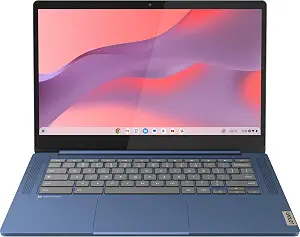
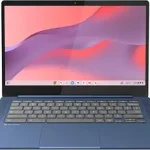
Best Budget is the editorial label for the Lenovo Flagship Chromebook, a touch option with a smaller listed memory and storage configuration than the Windows laptops in this guide. Its 14-inch Full HD touchscreen gives shoppers a defined screen size to consider for browsing, reading and everyday computing. The product runs Google Chrome OS and includes 4GB RAM + 64GB eMMC. Those details make it especially important to think about the applications and files you expect to use, rather than choosing from screen size alone. The label is a guide to its place in this selection, not a claim about a sale price or market-wide value.
The processor is a MediaTek Kompanio 520, specified as Octa-Core, 4x A73 @2.0GHz + 4x A53 @2.0GHz. Wireless details include Wi-Fi 6, 11ax 2×2 + Bluetooth 5.1 combo, and listed battery life is 13.5 hours. Consider those facts alongside Chrome OS: the operating system is a key part of the decision, particularly if you already know which software environment and applications you want to use. The listing does not provide a Windows configuration, so compare operating-system requirements before placing the Chromebook on your Black Friday shortlist.
The Lenovo may fit shoppers who want a touchscreen Chromebook and find its stated memory and eMMC storage suitable for their plans. If you often keep many files on a laptop or expect to rely on particular applications, check those needs against the configuration rather than assuming the category name tells the whole story. For Black Friday, verify that the offer is for this Lenovo model and the listed 14-inch, 4GB RAM + 64GB eMMC version. Then compare its Chrome OS setup and battery-life claim with the Windows options. The best choice depends on whether the stated features match your routine, not simply on the presence of a touch display.
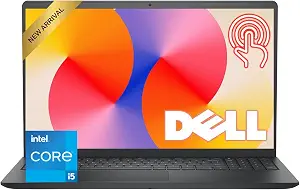
Best Overall is an editorial fit label for shoppers who want a Windows touch laptop with a broad set of listed everyday specifications. The Dell pairs a 15.6-inch Full HD touchscreen with a 120Hz refresh rate, IPS panel and anti-glare finish. That combination makes the display details particularly relevant if you expect to spend time reading, working through documents or navigating directly on screen. The label is not a claim of tested superiority; it reflects the balance of features provided for this guide. When Black Friday offers appear, check that the exact listing identifies this configuration before weighing its offer against the alternatives.
Its 13th Gen Intel Core i5-1334U processor has 10 cores and speeds up to 4.60GHz, alongside 8GB DDR4 RAM and a 512GB SSD. Those are the listed components to consider in relation to your intended workload and the files you plan to keep on the laptop. The system runs Windows 11 Home, which may suit shoppers who specifically want that operating system. The product information also lists an FHD 1080p webcam, a practical detail to consider if video calls are part of your routine. The specifications describe the configuration; they do not establish how it will perform with any particular app or workload.
Battery life is listed as up to 9 hours, so compare that stated figure with how and where you expect to use the laptop rather than treating it as a guarantee for every situation. For Black Friday, compare the exact Dell offer with the Lenovo and HP by checking the display, processor, memory, storage and operating system together. The Dell’s combination of a 15.6-inch touch display, Windows 11 Home and the specified processor gives it a clear place on this shortlist for shoppers who want those features in one device. Confirm the configuration details in the offer before making your choice.
Key specs
Processor
13th Gen Intel Core i5-1334U processor with 10 cores and speeds up to 4.60GHz
Memory
8GB DDR4 RAM
Storage
512GB SSD
Display
15.6-inch Full HD touchscreen with a 120Hz refresh rate, IPS panel, and anti-glare finish
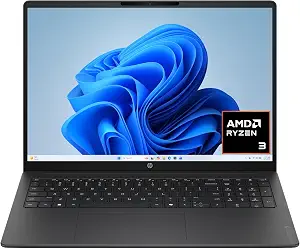
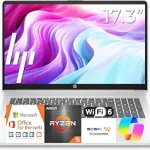
Best for a Larger Touch Workspace is the editorial label for the HP OmniBook 3, whose listed display is 16 inches diagonal. Its 2K (1920 x 1200), touch, IPS, micro-edge, anti-glare display is the most screen-focused reason to consider this model. The specification also gives a brightness of 300 nits. If you value a larger stated display area for arranging documents or viewing content, put those details high on your comparison list. The label reflects this specific fit within the products here; it does not mean the HP is the right choice for every shopper.
The HP uses an AMD Ryzen 3 7320U, listed with up to 4.1 GHz max boost clock, 4 MB L3 cache, 4 cores and 8 threads. It has 8 GB LPDDR5-5500 MT/s onboard memory and a 512 GB PCIe NVMe M.2 SSD, plus AMD Radeon 610M Graphics. These component details can help you compare the listed configuration with the software and workload you have in mind, but they are not a substitute for checking any specific application requirements. The operating system is Windows 11 Home, and wireless details include MediaTek Wi-Fi 6 MT7920 (2×2) and Bluetooth 5.4.
For calls, the listed camera is a 1080p FHD camera with HDR auto switch, temporal noise reduction and integrated dual array digital microphones. That is useful information to weigh if video communication matters to your routine. Unlike the Lenovo, the HP’s listing specifies Windows 11 Home; unlike the Dell, it emphasizes a 16-inch diagonal, 2K touch display. During Black Friday, compare the exact HP configuration against your preferred screen size and operating system, then check the complete listing before deciding. The display is a distinctive reason to shortlist it, while the remaining specifications help you assess whether the whole configuration makes sense for you.
AMD Ryzen 3 7320U (up to 4.1 GHz max boost clock, 4 MB L3 cache, 4 cores, 8 threads)
Memory
8 GB LPDDR5-5500 MT/s (onboard)
Storage
512 GB PCIe NVMe M.2 SSD
Graphics
AMD Radeon 610M Graphics
Wireless
MediaTek Wi-Fi 6 MT7920 (2×2) and Bluetooth 5.4 wireless card
Camera
1080p FHD camera with HDR auto switch, temporal noise reduction and integrated dual array digital microphones
Operating system
Windows 11 Home
Start with the setting where you will use touch
Touch input can be more useful in some routines than others. Picture the moments when you would reach for the display: scrolling through a page, selecting an item, or navigating without relying only on a keyboard and pointing device. Then decide how much screen area you want in front of you. The Lenovo lists a 14-inch Full HD touchscreen, the Dell a 15.6-inch Full HD touchscreen, and the HP a 16-inch diagonal touch display with 2K (1920 x 1200) resolution. Those are concrete distinctions to compare, not a guarantee that one size will feel right for every desk or task.
Think about where the laptop will sit and what you will view on it, without assuming a bigger screen is automatically better. The Dell and HP list anti-glare finishes, while the HP also specifies an IPS panel and 300 nits. The Dell lists an IPS panel and 120Hz refresh rate. These details can help you make a more informed Black Friday shortlist, but they do not replace checking the exact configuration offered. Consider whether screen size, stated resolution and the listed display finish align with your preferences, then compare the rest of the machine before treating a display feature as decisive.
Choose the software environment before the offer
Operating system is a practical way to narrow this group before Black Friday prices or promotions enter the picture. The Lenovo runs Google Chrome OS; both the Dell and HP list Windows 11 Home. Start with the software you already use or need, and check whether its requirements fit the operating system you are considering. If you are undecided, write down the everyday tasks that matter most, such as web use, documents or video calls, and investigate any application-specific needs before committing. The product facts here identify each operating system, but they do not establish compatibility with a particular app or service.
A touch screen does not make these operating systems interchangeable. A shopper comfortable with Chrome OS may prioritize the Lenovo’s combination of that system and a 14-inch Full HD touchscreen. Someone seeking Windows 11 Home can compare the Dell and HP based on their distinct displays and listed components. During Black Friday, read the complete offer description and confirm the operating system for the exact model and configuration. Avoid letting a headline or general product name substitute for that check. Making the operating-system decision first helps keep a tempting offer from pulling you toward a device that does not suit your software plans.
Read memory, storage and processor details in context
The listed configurations differ, so consider memory, storage and processor as a set rather than ranking one specification in isolation. The Lenovo has 4GB RAM + 64GB eMMC and a MediaTek Kompanio 520 processor. The Dell lists 8GB DDR4 RAM, a 512GB SSD and a 13th Gen Intel Core i5-1334U processor. The HP has 8 GB LPDDR5-5500 MT/s onboard memory, a 512 GB PCIe NVMe M.2 SSD and an AMD Ryzen 3 7320U. These facts are useful for matching configurations to your own plans; they do not predict results for every workload.
Ask yourself what you expect to install, store and keep open, then check whether the stated configuration fits. If you have a specific application in mind, consult its requirements instead of assuming a processor name alone answers the question. Black Friday makes it especially important to confirm the complete model details: an offer should be compared against the configuration you actually want, not against a broad product family. Storage type and capacity are both worth noting, as are the differences between the listed memory configurations. A deliberate check can help you separate a genuinely suitable setup from one that only looks appealing at a glance.
Use calls and wireless details as practical filters
If video calls or wireless connections matter in your routine, compare the features that are explicitly listed. The Dell specifies an FHD 1080p webcam. The HP lists a 1080p FHD camera with HDR auto switch, temporal noise reduction and integrated dual array digital microphones. That information gives you a useful basis for distinguishing their stated camera setups, though it cannot promise a particular call experience. The Lenovo’s provided facts do not list a camera, so use the exact product listing to answer any camera questions before buying rather than drawing a conclusion from the information summarized here.
Wireless specifications also vary: the Lenovo lists Wi-Fi 6, 11ax 2×2 + Bluetooth 5.1 combo; the HP lists MediaTek Wi-Fi 6 MT7920 (2×2) and Bluetooth 5.4. No wireless details are provided here for the Dell, so check its exact listing if connectivity specifics affect your decision. During Black Friday, these features can serve as useful tie-breakers after operating system, display and configuration have been narrowed down. Check the devices or network setup you plan to use against the listing, and do not assume that an unlisted detail is included or excluded.
Treat battery figures as a comparison point, not a promise
Battery life can influence whether a laptop fits your day, but the stated figures should be read in their original terms. The Lenovo lists 13.5 hours, while the Dell lists up to 9 hours. No battery-life figure is included in the supplied HP details. That is a reason to check the HP listing if battery information is important to you, not a basis for guessing its runtime. Consider how often you expect to work away from a power outlet and compare the published information with your priorities. Do not assume that a listed figure describes every pattern of use.
Black Friday comparisons are clearest when you separate confirmed details from questions that still need checking. Review the exact listing for the model and configuration, including the operating system, screen, memory, storage and any battery information you rely on. Then compare the actual offer presented for each specific version; this guide does not establish that any laptop is discounted or that a particular promotion is active. A useful decision is one that fits your requirements at the offer shown, not one based on an assumed saving. Keep a short checklist of must-haves so an appealing headline does not distract from a missing detail you need to verify.
Make your Black Friday choice
Before you choose, confirm the exact model and configuration in the listing, then check the operating system, display details, processor, memory and storage against your intended use. Verify camera, wireless and battery information if those features matter to you. The Lenovo is the Chrome OS option with a 14-inch Full HD touchscreen; the Dell combines Windows 11 Home with a 15.6-inch Full HD touchscreen; the HP pairs Windows 11 Home with a 16-inch diagonal 2K touch display. For Black Friday, compare the specific offer rather than assuming a sale or configuration. The right touch screen laptop is the one whose verified features match your needs.