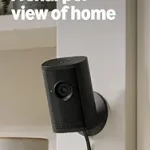
Best Nest Camera Buying Guide — Black Friday Deals 2026
A Nest camera purchase starts with a practical question: where do you want coverage, and what do you want to happen when activity appears? The battery-powered Nest Cam can be placed without setting it up near an outlet, while the wired indoor model is designed for a corded setup. The Nest Cam with Floodlight adds activity-triggered lighting. These are different jobs, not simply different versions of the same choice. During Black Friday, compare the exact model and variant in the offer with the features that matter to your routine. A deal label alone does not tell you whether the power setup, video history, or response features suit your space.
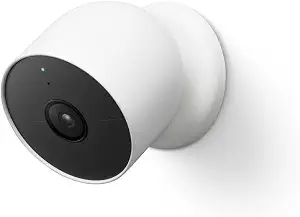
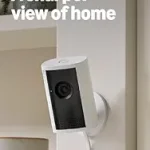
Google Nest Cam Outdoor or Indoor, Battery – Wireless Security Camera
Google Nest Cam Outdoor or Indoor, Battery – Wireless Security Camera (ASIN B09FCMSJZG)
Best Overall is the editorial pick for shoppers who want a Nest camera they can consider for either indoor or outdoor use and who value flexible placement. The Google Nest Cam Outdoor or Indoor, Battery is battery powered, so you don’t need to set it up near an outlet. That can make it a useful candidate when the spot you want to monitor is not close to one. Before a Black Friday purchase, picture the actual location and consider whether a battery-powered camera fits your plans better than a corded model.
For everyday awareness, this camera can tell the difference between a person, animal, and vehicle. That distinction may help you interpret an alert in context: a person arriving is different from an animal passing through, for example. It records 1080p HDR video with night vision, bringing daytime and dark conditions into the same camera choice. Detection and picture detail answer different questions, though. Think about whether you mainly want to know what kind of activity occurred, see video with night vision, or both.
Event history is another decision to make before adding it to your shortlist. The camera includes 3 hours of free event video history. A Nest Aware subscription, sold separately, can add up to 60 days of video history. It can also store up to an hour of recorded events when offline. Consider how soon you usually check an alert and whether the available history fits that habit; don’t assume a longer history is included in a Black Friday offer unless the actual offer clearly says so.
Its stated operating temperature is –4°F to 104°F (–20°C to 40°C), a detail to review if you are considering an outdoor location. The Best Overall label reflects this combination of battery-powered placement, event detection, and stated history options among the listed cameras; it is an editorial choice, not a measured ranking. On Black Friday, verify that the listing is for this battery model, then weigh placement freedom against the features and history you actually expect to use.
Key specs
Detection
can tell the difference between a person, animal, and vehicle
Video
1080p HDR video[1] with night vision
Event history
3 hours of free event video history[2]
Optional video history
add a Nest Aware subscription (sold separately) for up to 60 days of video history[3]
Offline event storage
store up to an hour of recorded events
Power and placement
it’s battery powered, so you don’t need to set it up near an outlet
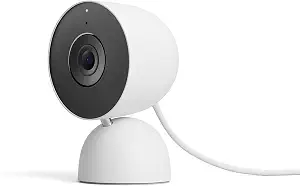
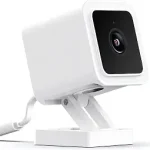
Best Budget is the editorial label for the Google Nest Cam Indoor (Wired, 3rd Gen) – 2025 – Snow. It is a wired indoor camera with corded electric power, so start by deciding whether a corded setup works in the room you have in mind. This is a different placement consideration from the battery-powered Nest Cam. When a Black Friday listing catches your eye, check that it names this indoor wired model and Snow variant rather than assuming another Nest camera has the same setup.
The camera offers 2K HDR video and night vision. If your priority is an indoor view, those are central details to compare with the other choices. It also has 2-way audio, which gives you a way to talk and listen through the camera. Consider whether conversation is part of the job you want it to do—for example, whether you want to communicate through the camera as well as view its video. The provided details do not specify event-history terms for this model, so check the actual listing and any stated service details rather than carrying over terms from another Nest Cam.
Security details may matter when you decide how comfortable you feel using a camera in your home. The product information lists encrypted video, two-step verification, and enhanced security through your Google Account. A green LED light lets you know when the camera is processing or streaming video. These are specific details to consider alongside the picture and audio features, particularly if you want a visible indication of camera activity.
The Best Budget designation is an editorial choice among these listed products, not a claim about its price or a tested comparison. Black Friday shoppers should compare the exact offer and variant instead of treating the label as proof of a discount. Check the model name, wired power description, and included features, then decide whether 2K HDR video, night vision, and 2-way audio match your intended indoor use. If a listing does not spell out a detail important to you, verify it before making that detail part of your decision.
Key specs
Video
2K HDR video
Night vision
see in the dark with night vision
Audio
2-way audio
Connectivity
Connectivity Technology Wired
Power
Power Source Corded Electric
Security
encrypted video, two-step verification, and enhanced security through your Google Account
Status indicator
green LED light lets you know when it’s processing or streaming video
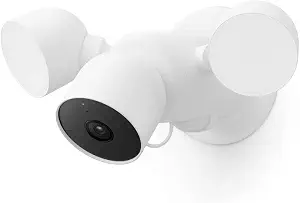
Best for activity-triggered lighting is the editorial label for the Google Nest Cam with Floodlight. Its distinguishing practical feature is that the floodlight automatically lights up when there’s important activity. If lighting in response to activity is part of the job you want a camera to do, that may make this model a more relevant candidate than choosing on video alone. For a Black Friday shortlist, consider whether you want this lighting response, rather than assuming every Nest Cam offers it.
The camera can tell the difference between a person, animal, and vehicle and send alerts directly through the Google Home app, with no subscription required for those alerts. It records 1080p HDR video with night vision. These details serve separate purposes: the detection feature classifies activity, the alerts notify you through the app, and the video gives you a view of the event. Decide which of those functions matter most to you, and check the offer for the exact Floodlight model before comparing it with other cameras.
The listed event-history allowance is 3 hours of free event video history. The camera can also store up to an hour of recorded events when offline. Keep these terms distinct from the activity alerts, since alerts and saved video history are not the same thing. If you rely on reviewing events later, consider whether the stated history suits your routine. Don’t infer that the history terms change just because a Black Friday listing emphasizes a particular camera feature.
Built-in speaker and microphone support two-way audio, so you can talk and listen through the camera. That could matter if you want a way to respond rather than only receive an alert and view video. The Best for activity-triggered lighting label describes why it stands out among these selections; it does not claim superior performance. During Black Friday, compare the exact product name and the included features, then decide whether automatic lighting, app alerts, video history, and two-way audio suit the way you want to use the camera.
Key specs
Activity alerts
can tell the difference between a person, animal, and vehicle and send alerts directly through the Google Home app[1], no subscription required
Video
1080p HDR video[1] with night vision
Event history
3 hours of free event video history[2]
Offline recording
store up to an hour of recorded events
Floodlight
it automatically lights up when there’s important activity
Two-way audio
talk and listen with the built-in speaker and mic
Start with the place you want to monitor
Write down the location you have in mind before comparing offers. The Nest Cam Outdoor or Indoor, Battery is battery powered and does not need to be set up near an outlet. The Nest Cam Indoor (Wired, 3rd Gen) is described as wired and corded electric. Those power details can help narrow your shortlist: ask whether the spot suits a battery-powered camera or whether a corded indoor setup fits your plan. The Floodlight model has a different purpose to weigh, with automatic lighting when there’s important activity.
Next, think about the kind of event you want to notice. A camera that can distinguish a person, animal, and vehicle may help you make sense of activity, while the indoor wired model’s listed features focus on 2K HDR video, night vision, and 2-way audio. The Floodlight camera combines activity distinctions and app alerts with lighting. These are not interchangeable descriptions, so match the features to the situation you care about rather than ranking the products by their names.
For Black Friday, use this placement decision to filter the actual listing. Check the full model name and variant, and confirm that the power description aligns with your intended use. Avoid assuming an offer applies to a different Nest Cam just because the product names are similar. If placement or power information is unclear on the offer, resolve that before treating its headline as a reason to buy.
Make video and detection two separate decisions
Picture format and activity detection answer different shopper questions. The battery-powered camera and Floodlight model both list 1080p HDR video with night vision. The indoor wired camera lists 2K HDR video and night vision. Those are the stated video details; they do not, by themselves, tell you which camera best fits your room or what an event alert will say. Choose the kind of view you want, then separately consider whether distinguishing a person, animal, and vehicle matters to you.
A useful way to decide is to imagine checking a clip after an alert. Would you mainly want a video view, a description of the activity type, or a way to respond? The battery and Floodlight cameras both include the stated person, animal, and vehicle distinction. The Floodlight model also sends alerts through the Google Home app without a subscription required for those alerts. The indoor model’s supplied details instead call out 2-way audio. Keep each feature tied to the model where it is listed.
During Black Friday, compare the exact video and detection information on the offer rather than relying on a broad phrase such as “Nest camera.” Confirm which model is being offered and whether its listed capabilities match your priorities. If the decision comes down to night vision, HDR video, or activity distinctions, use the product details as separate checkpoints. That approach helps prevent one appealing specification from standing in for a feature you actually wanted.
Choose a history plan around your habits
Ask yourself when you normally review an event. If you tend to check soon after receiving a notification, a shorter history window may be enough for your routine; if you want a longer period available, pay close attention to the terms. The battery-powered Nest Cam includes 3 hours of free event video history, and a Nest Aware subscription sold separately can add up to 60 days of video history. Its offline storage can hold up to an hour of recorded events.
The Floodlight camera also lists 3 hours of free event video history and storage of up to an hour of recorded events when offline. Its alerts through the Google Home app are a separate feature, and the stated alert capability does not require a subscription. Do not treat an alert, an event-history period, and offline recording as though they mean the same thing. Each affects a different part of how you receive or review activity.
The supplied details for the indoor wired camera do not specify event-history terms. That is a reason to check the actual product offer for information you consider essential, not a basis for assuming a particular history feature or subscription arrangement. On Black Friday, read any history language carefully and make sure it is attached to the exact model in the listing. Compare what is included with what is sold separately before deciding whether the offer fits your expectations.
Decide whether you want to communicate or illuminate
Some shoppers want a camera mainly to view activity; others want to do something when it appears. The Nest Cam with Floodlight automatically lights up when there’s important activity and includes a built-in speaker and mic for talking and listening. Its person, animal, and vehicle distinctions and Google Home app alerts add another way to respond to activity. Consider whether lighting and two-way audio are central to your intended use or simply features you may not need.
The indoor wired model also lists 2-way audio, but its stated power setup and video details are different: it is corded electric and offers 2K HDR video with night vision. If conversation is important for an indoor camera, note that feature while also checking whether the wired arrangement suits the location. For the battery-powered camera, the supplied facts emphasize flexible placement away from an outlet, detection, and video history. Choose based on the combination that fits, not on audio or lighting in isolation.
Black Friday can put several feature sets in front of you at once, so decide what response you want before judging the offer. A light that activates with important activity, an option to talk and listen, and an app alert are distinct considerations. Verify that each feature appears under the exact product you are considering. That simple check keeps a feature mentioned elsewhere in a category from being mistaken for part of a different camera’s offer.
Read the Black Friday offer as a model-specific listing
Treat the product title and variant as part of the offer, not as small print to skim past. The choices here include a battery-powered camera for outdoor or indoor use, an indoor wired model identified as 3rd Gen and Snow, and a camera with Floodlight. Match the listing to the model you intended to compare. Do not assume that a Black Friday offer for one Nest camera applies to another, or that the products share every listed capability.
Then check the features tied to your decision. Confirm the power description, video format, night vision, audio, detection, history, or lighting details that matter to you. For the battery and Floodlight cameras, the stated free event history is 3 hours; the battery model’s optional Nest Aware subscription is sold separately and can add up to 60 days. The indoor wired model’s supplied information does not state history terms. Read the actual offer for any details you need that are not specified here.
Finally, compare the exact offer without assuming a discount, stock status, or included service from the Black Friday label alone. Check the product name and variant, identify which features are explicitly described, and decide whether the stated setup suits your location and routine. If a key term is unclear, verify it before purchasing. A careful comparison is more useful than a broad deal claim because it connects the offer to the camera you actually meant to choose.
Make your Black Friday choice
The most useful Nest camera for you depends on the job you have in mind: flexible battery-powered placement, a corded indoor view with 2-way audio, or activity-triggered lighting with app alerts. Decide on location first, then compare the specific video, detection, history, and response details you care about. During Black Friday, check the exact model and variant and do not assume an offer includes features or services that are not stated. These editorial labels can help organize the shortlist, but your own placement and usage needs should make the final call.