Best Soundbar Buying Guide — Black Friday Deals 2026
A soundbar purchase starts with the TV, the room, and the kind of listening you want to improve—not the size of a Black Friday headline. These three options take different approaches: ULTIMEA pairs a 5.1-channel system with a wired subwoofer and extensive app adjustments; TCL offers a 2.1 setup with a wireless subwoofer and room calibration; Bose keeps the bar itself compact and includes a dialogue mode. Before comparing any Black Friday offer, check the exact model and variant, the connections available on your TV, and what components are included. The right shortlist is the one that fits your setup and the features you expect to use.
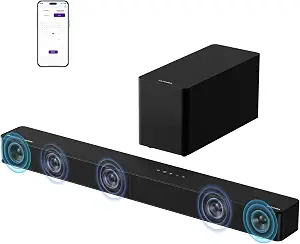
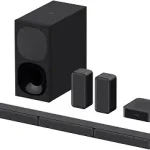
ULTIMEA 5.1CH Surround Sound Bar System with Dolby Atmos, Poseidon M60
ULTIMEA 5.1CH Surround Sound Bar System with Dolby Atmos, Poseidon M60 (ASIN B0F62YBNSX)
Best Overall is an editorial pick for shoppers who want several sound-format and adjustment details in one system to compare. The ULTIMEA Poseidon M60 is a 5.1-channel soundbar system with Dolby Atmos, five built-in speakers including two side-firing drivers, and a 5.25-inch wired subwoofer with BassMX Technology. Its listed peak power is up to 300W. Those specifications make it a candidate for someone assembling a more component-rich living-room setup, rather than a shopper who wants to consider only the bar itself. Whether its arrangement suits your room depends on your space and preferences; the channel label alone cannot promise a particular listening experience.
The connection list includes HDMI eARC, Optical, and Bluetooth 5.4. Check which connection your TV supports and which cable or input you intend to use before settling on this model. The wired subwoofer is also worth considering in practical terms: decide where the subwoofer can sit and whether routing its connection works with your room. That is a placement question, not a reason to assume the system will or will not fit a particular layout.
App controls are a notable part of the product details. They include a 10-band graphic EQ, 121 sound presets, and 13 adjustable surround levels. If you enjoy changing sound settings for different content, these controls give you specific options to weigh. If you prefer to set up a system and rarely adjust it, consider whether that range matters to your purchase. A Black Friday listing should be checked for the exact Poseidon M60 model and the included system components, rather than judged by a broad claim about a soundbar deal. The Best Overall label reflects this guide’s selection among the featured products, not a measured ranking or a promise that it suits every room.
Key specs
Audio channels
5.1 Channel with Dolby Atmos
Connectivity
HDMI eARC, Optical, Bluetooth 5.4
Subwoofer
5.25-inch Wired Subwoofer with BassMX Technology
Peak power
up to 300W of peak power
Soundbar speakers
Five built-in speakers, including two side-firing drivers
App controls
a 10-band graphic EQ, 121 sound presets, and 13 adjustable surround levels
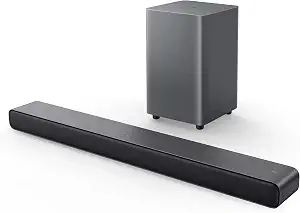
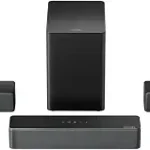
TCL S55H 2.1 Sound Bar with Wireless Subwoofer for Smart TV
TCL S55H 2.1 Sound Bar with Wireless Subwoofer for Smart TV (ASIN B0D1JBBJ6S)
Best Budget is the assigned label for the TCL S55H, but it does not mean a specific sale price or guaranteed Black Friday savings. It is a 2.1 soundbar with a wireless subwoofer, Dolby Atmos, DTS Virtual:X, and Surround Sound listed among its audio formats. Its maximum output is 220 watts. These details give shoppers a concrete starting point for considering a soundbar-and-subwoofer arrangement while comparing the actual offer and included items. Treat the label as an editorial choice within this guide, not proof that the TCL will be the least expensive option when you shop.
The S55H includes AI Sonic Auto Room Calibration, a listed feature to consider if calibration is part of your priorities. Its connections are Auxiliary, Bluetooth, HDMI, Optical, and USB. Check the TV inputs and the intended connection before checkout, and note that the product listing describes the subwoofer connection as wireless. The soundbar dimensions are 3.86″D x 31.89″W x 2.36″H, which you can compare with your available space and the arrangement of your TV area. Measure the space you plan to use rather than assuming a bar will fit based on a product photo.
This option may suit a shopper who wants a clearly specified 2.1 configuration and a wireless subwoofer connection, while still considering formats and room calibration. Those are useful decision points, not guarantees about how the sound will seem in an individual room. During Black Friday, confirm that the offer is for the S55H and review the complete listing for what is included. Compare the same model across offers, checking connection details and components before you weigh price. The Best Budget designation is limited to the products in this guide; it is not a claim about market-wide pricing, an active promotion, or future availability.
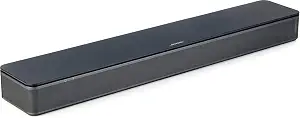
Best for dialogue-focused TV viewing is the Bose TV Speaker’s assigned label, based on its remote control’s dialogue mode, which is described as further enhancing speech. The remote also enables a bass boost for more depth. These are specific controls to consider if you often want a way to adjust speech or bass, though the product details do not establish how any particular viewer will perceive the result. The speaker has two angled full-range drivers, another point to weigh when comparing its design with the other systems in this guide.
The Bose TV Speaker measures 2.21″ H x 23.38″ W x 4.02″ D. Use those listed dimensions to check the intended space near your TV, rather than relying on an impression from a listing image. Its connection options include Bluetooth version 4.2, HDMI ARC (Audio Return Channel), Optical in, AUX in, and USB for service only. The product can connect up to three devices through HDMI, Optical in, and AUX in. For TV setup, an optical audio cable is included, while an HDMI cable is sold separately. Check your TV’s available output and the cable you will need before comparing an offer.
The speaker is also compatible with the Bose Bass Module 500 or 700. The required Bose Bass Module Connection Cable or a standard 3.5 millimeter audio cable is sold separately, so include that detail in your planning if a compatible bass module is relevant to you. It is not necessary to add a module simply because compatibility is listed; decide whether that is part of your intended setup. On Black Friday, check the exact Bose TV Speaker listing, the included optical cable, and any separately sold accessories you might need. The Best for dialogue-focused TV viewing label highlights a listed control, not a test result or a claim that this is the right choice for every listener.
Key specs
Dimensions
2.21″ H x 23.38″ W x 4.02″ D
Drivers
2 angled full-range drivers
Connectivity
Bluetooth version: 4.2 / HDMI ARC (Audio Return Channel) / Optical in / AUX in / USB (for service only)
Device connections
Connect up to 3 devices through the inputs (HDMI, Optical in, and AUX in)
TV setup
via an optical audio cable (included) or an HDMI cable (sold separately)
Remote control
enables a dialogue mode to further enhance speech or add a bass boost for more depth
Bass module compatibility
compatible with the Bose Bass Module 500 or 700 and requires the Bose Bass Module Connection Cable or a standard 3.5 millimeter audio cable, sold separately.
Make your TV and intended connection the first filter
Before comparing sound formats or a Black Friday price, identify the audio connection you expect to use. The ULTIMEA lists HDMI eARC, Optical, and Bluetooth 5.4. TCL lists Auxiliary, Bluetooth, HDMI, Optical, and USB. Bose lists Bluetooth version 4.2, HDMI ARC, Optical in, AUX in, and USB for service only. Those lists are not interchangeable, so check your TV’s ports and decide how you want to connect it. If you plan to use an HDMI connection, note the distinction between the ULTIMEA’s eARC and Bose’s ARC wording; do not assume they are identical based only on the names.
Cable details matter, too. Bose specifies that an optical audio cable is included for TV setup, while an HDMI cable is sold separately. The product facts here do not specify what cables come with the other two systems, so check the actual listing rather than assume. If Bluetooth is your intended connection, compare the listed version where provided and verify that it serves your use. Keep your shortlist focused on products that fit your planned connection, then review Black Friday offers for the exact model and included items.
Choose a system layout that fits how you use the room
Think about the full system, not just the bar that sits near the TV. ULTIMEA specifies a 5.1-channel system with five built-in speakers, including two side-firing drivers, and a 5.25-inch wired subwoofer. TCL is described as a 2.1 soundbar with a wireless subwoofer. Bose’s listed product details focus on the TV Speaker itself, with compatibility for the Bose Bass Module 500 or 700. These are different arrangements to consider, not a simple scale from better to worse. Decide whether you want to plan around a wired subwoofer, a wireless subwoofer connection, or a speaker with separately available module compatibility.
For a practical check, picture where each component would go and whether you can accommodate its stated connection. With ULTIMEA, account for the wired subwoofer when planning placement. TCL’s subwoofer connection is described as wireless, which may suit a different room-planning preference. Bose’s compatible modules and required, separately sold cable are relevant only if you plan to use that option. Before a Black Friday purchase, make sure the offer identifies the system or speaker you mean to buy and clarifies included components. Avoid valuing a listing by the number of pieces shown in an image alone.
Compare format and adjustment features with your everyday listening
The format names and controls can help narrow a shortlist, but choose them in relation to your own habits. ULTIMEA lists Dolby Atmos and app controls that include a 10-band graphic EQ, 121 sound presets, and 13 adjustable surround levels. TCL lists Dolby Atmos, DTS Virtual:X, Surround Sound, and AI Sonic Auto Room Calibration. Bose’s supplied details emphasize its dialogue mode and bass boost on the remote, along with two angled full-range drivers. Each product therefore offers different information to assess; the descriptions do not establish a direct performance comparison.
Ask yourself what you are likely to adjust. If you like having many app settings to explore, ULTIMEA’s specified controls are relevant. If room calibration is on your checklist, look closely at TCL’s named feature. If a speech-oriented remote mode is a priority, Bose’s dialogue mode is a concrete feature to compare. None of these details guarantees a particular effect with every program, room, or listener. Use Black Friday as a moment to check the exact model and read its feature list carefully, not as a reason to buy a sound format or control you do not expect to use.
Read power and dimensions as planning details, not promises
Output figures can be useful for comparing listings, but they do not by themselves tell you how a system will sound in your space. ULTIMEA specifies up to 300W of peak power; TCL specifies maximum output of 220 watts. These descriptions use different terms, so avoid treating the figures as a direct guarantee of loudness or sound quality. Bose’s supplied facts do not give an output figure, which is not evidence for or against its performance. Keep each specification in context and give more weight to the connection, arrangement, and controls that matter to your setup.
Dimensions provide a more direct fit check. TCL’s soundbar is listed as 3.86″D x 31.89″W x 2.36″H, while Bose lists 2.21″ H x 23.38″ W x 4.02″ D. Compare the supplied figures with the space you have planned, keeping the product’s stated order and notation in view. ULTIMEA’s supplied facts do not include soundbar dimensions, so consult the actual listing if bar clearance is a deciding factor. During Black Friday, confirm that the dimensions and specifications shown belong to the exact model in the offer.
Use a Black Friday checklist for the final comparison
A useful Black Friday comparison is one you can repeat across the exact offers you are considering. First, confirm the model name: Poseidon M60, TCL S55H, or Bose TV Speaker. Next, match the listed connections to your TV and your intended setup. Then check the component arrangement, cable details, and any accessory needs. For Bose, the optical audio cable is included for TV setup, the HDMI cable is sold separately, and the specified cable for a compatible bass module is also sold separately. For the other products, verify included items on the listing rather than filling gaps with assumptions.
Only after those checks should you compare the displayed price and offer details. No particular discount, price, or active promotion is established here, and a headline does not confirm that two listings contain the same variant or components. Compare like with like, record what the actual offer says, and decide whether the features justify the amount shown to you. If a detail that affects your setup is unclear, pause and verify it on the product listing before checkout. This simple sequence makes a Black Friday decision more grounded in your needs than in urgency or a broad sale label.
Make your Black Friday choice
A sensible soundbar shortlist comes from matching the TV connection, system layout, and useful controls to your own setup. ULTIMEA gives you a 5.1-channel system, a wired subwoofer, and extensive app adjustments to consider; TCL combines a 2.1 configuration, wireless subwoofer connection, and room calibration; Bose offers a dialogue mode and specified compact-bar dimensions, with bass-module compatibility as a separate consideration. None is automatically right for every room. Before buying during Black Friday, confirm the exact model, the offer’s included items, and any cable or accessory needs. Then choose the listing that fits your plan—not just the most prominent deal.