Best Gaming Desktops Buying Guide — Black Friday Deals 2026
Choosing among gaming desktops is easier when the configuration is treated as a whole rather than judged by a single component. The ASUS ROG G700 AI pairs an Intel processor with an RTX graphics card and liquid cooling; the CyberPowerPC combines an AMD processor with an RTX 5060 Ti and lists its memory, storage, and included keyboard and mouse; the MSI Codex Z2 lists an RTX 5070 alongside 32 GB of DDR5 and 2 TB of storage. Those differences point to distinct priorities, not a universal winner. During Black Friday, check the exact model and configuration shown on the offer before comparing options. The recommendations here identify useful starting points among these three desktops; they do not indicate a verified promotion or measured performance result.
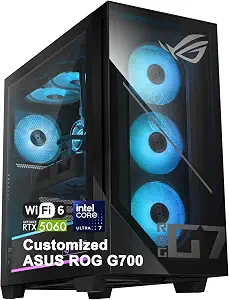
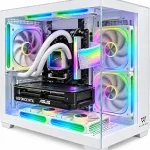
Best Overall is the editorial label for the ASUS ROG G700 AI Gaming Desktop because its listed details span several parts of a gaming setup: processor, graphics, cooling, networking, ports, and power supply. That breadth can make it a useful first option for someone who wants to compare a complete set of core components rather than start with memory or storage capacity, which are not specified in the supplied details. The label is a shortlist suggestion among these products, not a claim that the system outperforms other desktops.
For a planned setup, the processor is an Intel Core Ultra 7 265KF with 20 cores, 20 threads, speeds up to 5.5GHz, and 30MB Intel Smart Cache. Graphics are handled by an NVIDIA GeForce RTX 5060 GPU with 8GB GDDR7 memory. Those exact details help you compare this configuration with the games and display setup you have in mind; they do not, by themselves, guarantee a particular frame rate or resolution. If you are weighing it against another desktop, compare the graphics model and processor details directly instead of treating a model name as a performance promise.
The listed 240mm liquid cooler is another concrete point to consider while planning the tower’s placement and your preferences for cooling hardware. Its presence is useful to know, but the listing details do not establish noise levels or temperatures. For connecting a setup, the desktop lists 2.5Gbps Ethernet and Wi-Fi 6, along with multiple USB-A, USB-C, DisplayPort 1.4, and audio ports. Think through which connections you expect to use, then confirm the full configuration if a particular port matters to your desk.
Power is specified as a 600W 80+ Gold power supply. Taken together, these details make the ASUS a well-rounded comparison candidate when Black Friday listings tempt you to focus on one headline component. Check that the offer is for this exact G700 configuration, including the RTX 5060 and 240mm cooler, and review the current listing for any details that matter to your setup. No sale price or promotion is assumed here.
Key specs
Processor
Intel Core Ultra 7 265KF processor with 20 cores, 20 threads, up to 5.5GHz, and 30MB Intel Smart Cache
Graphics
NVIDIA GeForce RTX 5060 GPU and 8GB GDDR7 memory
Cooling
A 240mm liquid cooler
Networking
2.5Gbps Ethernet and Wi-Fi 6
Ports
Multiple USB-A, USB-C, DisplayPort 1.4, and audio ports
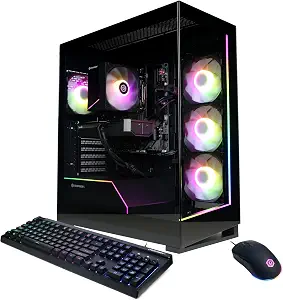
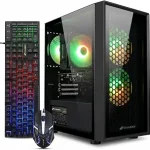
Best Budget is the supplied editorial recommendation for the CyberPowerPC Gaming PC, but it should not be read as a statement about its current price or a guaranteed Black Friday discount. The practical way to use that label is to consider this configuration when you want a listed combination of an AMD processor, RTX 5060 Ti graphics, memory, storage, Windows, and included input devices. Compare the exact offer and variant with other desktops rather than assuming the label means it will be the least expensive option available.
Its AMD Ryzen 7 8700F is listed at 4.1GHz with 8 cores, and the graphics card is an NVIDIA GeForce RTX 5060 Ti with 8GB. Those are useful starting points for matching a desktop to the games and display setup you plan to use. They are not a substitute for checking the requirements of particular games, nor do they establish how a game will run. If your shortlist includes the ASUS, note the difference between the listed RTX 5060 Ti here and the ASUS’s RTX 5060; the supplied specifications do not provide a tested performance comparison.
The CyberPowerPC includes 16GB DDR5 memory and a 1TB PCIe 4.0 NVMe SSD, plus Windows 11 Home. This gives shoppers specific figures to compare with their own expectations for installed memory and storage. Consider how much room you want for games and other files, and whether the listed starting capacity fits your plans. The details supplied do not state upgrade options, so verify those separately if future expansion is important to your decision.
WiFi 6 and Bluetooth 5.3 are listed for connectivity, and a keyboard and mouse are included. That bundle may be convenient if you are assembling a setup and want those input devices in the same offer; check the listing for the exact items and configuration before relying on it. During Black Friday, compare what is actually included alongside the processor, graphics, memory, and SSD. The Best Budget label helps identify a value-focused candidate for comparison, not a price prediction or an endorsement of a particular offer.
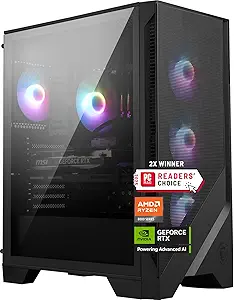
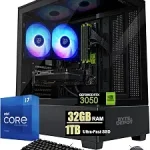
Best for Listed Memory and Storage is the editorial label for the MSI Codex Z2 Gaming Desktop. It reflects the specific capacities in the supplied product details: 32 GB of DDR5 memory and 2 TB of storage. Those figures make this a natural option to examine if you want a desktop whose listed configuration gives memory and storage prominent roles in your shortlist. The label does not claim that this is the best choice for every library or that its capacities outperform a particular competitor in use.
The graphics specification is an NVIDIA GeForce RTX 5070, while the product name identifies an AMD R7-8700F processor. For a planned gaming setup, compare those named components with the demands of the games you play and the rest of your intended system. The supplied facts do not include processor clock speed, core count, or measured gaming results, so do not fill those gaps by assumption. When comparing this MSI with the other desktops here, keep the distinction between stated specifications and performance claims clear.
The listed 32 GB DDR5 memory and 2 TB storage may suit shoppers who want those capacities specified in the configuration they are considering, rather than making a choice based only on the graphics card. Think about the space your games and other files may occupy, and compare the stated storage with your own plans. Windows 11 Home is also listed, giving you another concrete configuration detail to check against your preferences. The supplied information does not describe expansion options or included accessories, so verify those on the exact listing if they affect your purchase.
The desktop’s dimensions are listed as 16 x 8.38 x 19 inches. Check that exact formatting against the space available for a tower before placing an order, and consider how its position relates to your desk and nearby connections. As Black Friday offers appear, confirm that the listing names the Codex Z2 configuration with RTX 5070, 32 GB DDR5, and 2 TB storage. The recommendation is based on these listed memory and storage details, not on an assumed discount, review consensus, or market-wide ranking.
Key specs
Graphics
NVIDIA GeForce RTX 5070
Memory
32 GB
Memory type
DDR5
Storage
2 TB
Operating system
Windows 11 Home
Dimensions
16 x 8.38 x 19 inches
Plan the setup around the way you play
Start by writing down what matters in your own setup: the games you return to, the display arrangement you intend to use, and whether the desktop will also handle everyday tasks. This is more useful than deciding from a product name alone. The three options have different listed graphics and processor details, but the supplied information does not include game-specific results. Use the named parts to narrow the shortlist, then check requirements for the games and accessories you already have in mind.
During Black Friday, a prominent offer can make one specification seem like the whole story. Pause to confirm the exact desktop and configuration, then compare its other listed components as well. The ASUS provides detailed processor, cooling, networking, port, and power information. The CyberPowerPC gives specific memory and SSD capacities and includes a keyboard and mouse. The MSI lists its graphics card, memory, storage, operating system, and dimensions. Which of those details matters most depends on your plan, not on a general-purpose ranking.
Make graphics and processor details work together in your comparison
Graphics and processor names are useful for identifying what a desktop includes, but they are not complete predictions of how it will perform in your own games. The ASUS lists an Intel Core Ultra 7 265KF and an RTX 5060 with 8GB GDDR7 memory. CyberPowerPC specifies an AMD Ryzen 7 8700F at 4.1GHz with 8 cores and an RTX 5060 Ti with 8GB. MSI lists an RTX 5070 and identifies an AMD R7-8700F in its product name. Keep these details attached to their respective configurations when comparing.
If you are evaluating Black Friday offers, avoid treating a higher-sounding model number or a single component as proof of a better experience. Look at the exact card, processor details provided, and the rest of the system. Check the requirements of the games you care about and consider the display setup you intend to connect. Where a specification is not given here, consult the exact listing rather than estimating it. This approach makes your comparison specific without claiming unprovided frame rates, resolutions, or compatibility.
Decide what capacities fit your library and routine
Memory and storage can shape how a desktop fits into your day-to-day plans, so compare their stated capacities directly. The CyberPowerPC lists 16GB DDR5 and a 1TB PCIe 4.0 NVMe SSD. MSI specifies 32 GB DDR5 and 2 TB of storage. The ASUS facts provided here do not specify memory or storage capacity, which means those details should be checked on the exact listing if they matter to your decision. Missing information in this comparison is not evidence that a feature is absent.
Think about the games and other files you expect to keep installed, as well as how much capacity you want at the outset. Black Friday can bring attention to a headline graphics specification, but the configuration you actually receive matters just as much. Match the capacities on the offer to the product variant, and verify any expansion questions directly if they affect your plan. The supplied facts do not establish upgrade paths, so do not assume that a listed capacity can be changed later.
Check the connections and cooling details your space calls for
Before choosing a tower, consider where it will sit and what you expect to connect. ASUS lists multiple USB-A, USB-C, DisplayPort 1.4, and audio ports, as well as 2.5Gbps Ethernet and Wi-Fi 6. CyberPowerPC lists WiFi 6 and Bluetooth 5.3. The MSI details provided do not enumerate its ports or networking, so check its precise listing if a specific connection is essential. These distinctions help you frame questions without assuming that an unlisted feature is missing.
Cooling and physical placement deserve their own checks. The ASUS includes a 240mm liquid cooler, while the MSI’s dimensions are listed as 16 x 8.38 x 19 inches. Use the dimensions as written when checking your available space, and consult the listing for any other measurements you need. During Black Friday, confirm that the offer is for the configuration whose cooling and connection details you reviewed. The supplied facts do not establish noise, temperatures, or how a tower will fit your particular room.
Read a Black Friday offer as a complete configuration
A deal page should be compared against the product you meant to consider, not just against a headline or a product-family name. Confirm the desktop model and the specifications shown on the offer. For the ASUS, that may mean checking the RTX 5060, 240mm liquid cooler, and 600W 80+ Gold power supply. For CyberPowerPC, check the RTX 5060 Ti, 16GB DDR5, 1TB SSD, and whether the stated keyboard and mouse are included in that exact configuration. For MSI, verify the RTX 5070, 32 GB DDR5, and 2 TB storage.
Black Friday wording alone does not establish that a promotion is active or that an offer is favorable for your needs. Compare the exact listing details with your shortlist, and review any information relevant to your decision before purchasing. Do not assume that similarly named configurations have identical components. These recommendations are limited to the supplied products and facts; they do not provide current prices, savings, inventory information, or seller terms.
Make your Black Friday choice
A useful gaming desktop shortlist begins with the parts and capacities that fit your own plans. The ASUS is the broad-component comparison pick, CyberPowerPC is the editorial Best Budget option, and MSI stands out here for its listed memory and storage. Each label applies only among these featured desktops and is not a measured award. When Black Friday offers catch your eye, confirm the exact model and configuration, compare the specifications that matter to you, and check any unanswered questions on the listing. That way, the decision rests on the system being offered rather than a promotion headline or an assumption.