Best Baby Monitor Buying Guide — Black Friday Deals 2026
A baby monitor can be a visual check-in, an audio link, or a combination of both. Start by deciding what you expect to use most: seeing the nursery on a dedicated screen, hearing sounds without video, or being able to speak through the monitor. The products here cover those different routines, with features such as infrared night vision, two-way audio, temperature monitoring, and sound options. For Black Friday, compare the exact model and variant shown in the offer with the features you want; the event itself does not establish that a particular listing is discounted. The best choice is the one whose documented functions match your household’s everyday check-ins.
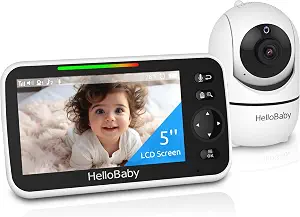
HelloBaby No WiFi Baby Monitor Camera and Audio HB6550, 5″ Video Screen
HelloBaby No WiFi Baby Monitor Camera and Audio HB6550, 5″ Video Screen (ASIN B09GM8JZM9)
Best Overall is the editorial pick for shoppers who want a broad set of video-monitoring features in one system. The HelloBaby HB6550 has a 5″ video screen and a camera that can be remotely controlled to rotate 355° horizontally and 120° vertically. Those controls give caregivers a way to adjust the camera’s view from the monitor rather than relying only on a fixed viewing direction. Its 2X zoom function is another option when a closer view is useful. Consider whether screen viewing and camera adjustment are central to your routine before making those capabilities a priority.
The HB6550 also combines video with audio and nursery information. Infrared night vision supports viewing in a dark room, while two-way audio lets a caregiver communicate through the monitor. A room temperature monitor and alert adds a separate check-in detail, and eight lullabies provide built-in sound options. These features can suit a caregiver who prefers to use one monitor for several kinds of nursery check-ins. They are not a reason to assume every function will matter equally: think about which ones you expect to use, and whether you would rather have a simpler audio-focused device.
For households planning to monitor more than one space, the system’s multi-camera expandability supports up to four cameras. Its stated battery average life is 30 hours. Treat that battery figure as a specification to compare with your own charging habits, rather than a guarantee of the time you will get in every use pattern. The Black Friday shortlist should also distinguish the HB6550 from similarly named or bundled listings: check the model and the specific variant before comparing the offer. The Best Overall label is an editorial choice among the products in this guide, not a claim of measured superiority. Pick this model if camera movement, video, two-way audio, and the other listed features fit your priorities.
Key specs
Display
5″ Video Screen
Camera movement
Remote control camera rotate 355° in horizontal and 120° vertical
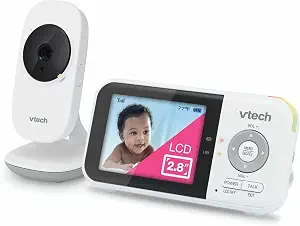
VTech Baby Monitor No WiFi | VM819 (ASIN B08V8RWP3W)
Best for no-WiFi video monitoring, the VTech VM819 is a fit for shoppers who want a video monitor with a connection that does not use WiFi, the internet, or any cloud. Its stated wireless technology is encrypted 2.4GHz FHSS. That connection description is a useful starting point for caregivers who are specifically comparing monitor arrangements that do not rely on an internet or cloud connection. Read the exact model details on the Black Friday offer, rather than treating a broad product-family name as enough to identify what is included.
The VM819 has a 2.8-inch LCD, infrared night vision that activates automatically when the nursery gets dark, and 2x digital zoom. These details make it possible to compare its viewing approach with a larger-screen monitor or a monitor with remote camera movement, if those features matter to you. The listed facts do not describe camera movement, so base a decision on the functions the listing does specify instead of assuming a particular control. Night vision is also distinct from room-temperature monitoring: choose according to the kind of information you want during a check-in.
Two-way talkback lets your baby hear your voice, and the monitor includes two lullabies and two ambient sounds: white noise and a trickling stream. Battery life is specified as up to 19 hours of continuous video streaming, or up to 29 hours of audio-only monitoring. Those are different usage descriptions, so compare the one that best resembles how you expect to use the monitor. For Black Friday, verify that the offer names the VM819 and assess its listed features against your priorities without assuming a discount or a particular bundle. This guide’s Best for no-WiFi video monitoring label highlights the model’s stated connection approach; it does not imply that other products lack any particular connection feature.
Key specs
Connection
never connects to WiFi, the internet, or any cloud
Wireless technology
encrypted 2.4GHz FHSS technology
Display
The 2.8-inch LCD
Night vision
infrared night vision activates automatically when the nursery gets dark
Zoom
2x digital zoom
Battery life
up to 19 hours of continuous video streaming – or up to 29 hours of audio-only monitoring
Soothing sounds
Two lullabies and two ambient sounds (white noise and trickling stream)
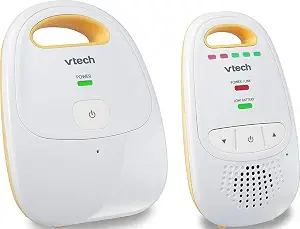
Best Budget is the editorial label for the VTech DM111, an audio baby monitor for shoppers whose main need is listening rather than viewing a screen. Its listed connection protocol is DECT, and it has two channels. The product information also identifies two-way audio, volume control, a battery strength indicator, and an out-of-range alert. These are practical details to weigh if your usual check-in is listening for sounds and responding by voice. The label is a choice among the products in this guide, not a statement about price, measured performance, or market-wide value.
The DM111 has a maximum talking range of 1000 feet. Treat that as the stated maximum, not a promise about the range you will experience in every setting. The product also lists an average battery life of 8 hours and requires two AAA batteries, which are included. Consider how you prefer to power a monitor and how often you are comfortable checking its battery status. The battery strength indicator is a listed feature, but the provided information does not specify how it signals battery level; use the product listing for any further detail you need.
Because the DM111 is identified as an audio monitor, it is a straightforward candidate when video is not a priority for your check-ins. Its listed dimensions are 1.9″D x 4.6″W x 2.6″H, which you can compare with the space where you expect to place or carry it. The Black Friday offer should be checked against the exact DM111 model and its included items; do not infer a sale price, bundle, or savings from the event name. If two-way audio, volume control, and the listed alert features match your routine, this model may be the clearest fit among these choices. If seeing the nursery is essential, compare the video options instead.
Key specs
Channels
Number of Channels 2
Audio features
Additional Features 2-Way Audio, Battery Strength Indicator, Out of Range Alert, Volume Control
Talking range
Talking Range Maximum 1000 feet
Battery life
Battery Average Life 8 hours
Connectivity
Connectivity Protocol DECT
Batteries
2 AAA batteries required. (included)
Dimensions
Item Dimensions D x W x H 1.9″D x 4.6″W x 2.6″H
Choose the check-in you will actually use
Begin with the role you want the monitor to play. If you want to see the nursery on a dedicated screen, the HelloBaby HB6550 and VTech VM819 both list video displays. The HB6550 pairs its 5″ screen with remotely controlled camera rotation and 2X zoom. The VM819 lists a 2.8-inch LCD and 2x digital zoom. These are distinct feature sets, so decide which listed controls matter rather than choosing by screen size alone. If you primarily want to hear sounds and speak through the monitor, the VTech DM111 is identified as an audio baby monitor and lists two-way audio.
Think about the moments when you would reach for the monitor. A visual check-in may be useful to your routine, while a sound-based check-in may be enough for another household. Two-way communication appears in the feature lists for all three products, though the VM819 describes it as talkback and the others list two-way audio. If you want nursery sound options, compare the HB6550’s eight lullabies with the VM819’s two lullabies and two ambient sounds. Don’t assume that a feature you do not see in a short summary is unavailable; confirm the exact product details before deciding.
During Black Friday, use this needs-first shortlist before comparing offers. Write down whether video, camera adjustment, audio-only monitoring, or built-in sounds are essential, then check each exact model listing against that list. This helps separate a relevant offer from one that merely shares broad baby-monitor wording. Avoid treating an event label as proof of a price reduction, and do not let a feature become a priority just because it appears in a listing. A useful choice is one whose documented capabilities answer the check-in needs you identified.
Read the connection details as part of the choice
Connection preferences can be a deciding factor, so read the wording carefully. The VM819 is described as never connecting to WiFi, the internet, or any cloud, and its wireless technology is encrypted 2.4GHz FHSS. The DM111 lists DECT as its connectivity protocol. The provided HB6550 details identify it as a no-WiFi baby monitor. These descriptions are not interchangeable, and they do not establish how every household’s setup will work. Match the exact stated connection information to your own preferences instead of drawing conclusions from a product category or brand name.
If avoiding an internet or cloud connection is important to you, the VM819’s explicit connection description gives you a concrete detail to verify on the listing. If you are comparing the DM111, note its listed DECT protocol and consider whether the product information answers your questions about its use. For the HB6550, retain the no-WiFi wording provided for that model rather than assuming details that have not been specified here. When a connection term is unfamiliar, use the product page’s description to clarify it before purchase.
Black Friday listings can place different model names and variants close together. Check that the offer identifies the exact model you intend to buy, and read the connection language on that specific listing. Do not assume that an offer for one model applies to another or that a product image settles what its connection arrangement is. A deliberate check is especially useful if connection type is a must-have rather than a preference. Keep your decision grounded in the stated model facts, and seek clarification when a listing leaves a detail important to you unresolved.
Decide how much of the nursery you want to see
For video monitoring, compare more than the presence of a screen. The HB6550 lists a 5″ video screen, remote camera rotation of 355° horizontally and 120° vertically, and 2X zoom. The VM819 lists a 2.8-inch LCD and 2x digital zoom. Camera movement is a specific listed control for the HB6550; zoom is listed for both. Consider whether you want to adjust the camera remotely or whether the features documented for the VM819 better fit your needs. These facts describe different options, not a measured comparison of image quality.
Night viewing is another practical point. Both video products list infrared night vision. The VM819 description says it activates automatically when the nursery gets dark. The HB6550 listing identifies infrared night vision without the same activation detail in the facts provided here. If automatic activation matters to you, verify that detail on the exact offer rather than extending one product’s description to another. Also consider whether a room-temperature alert matters: that feature is listed for the HB6550, while it is not included in the VM819 facts provided for this guide.
When assessing a Black Friday offer, check that the screen and camera details belong to the model named in the listing. A product photo or general title may not answer questions about the exact controls or included variant. Make a short feature checklist before you compare offers: screen viewing, camera movement, zoom, night vision, and any additional nursery information you want. Then weigh the details against your routine. If you do not need video, the audio-focused DM111 may be worth considering instead of paying attention to visual features that are not part of your intended check-in.
Balance talkback, soothing sounds, and alerts
A monitor’s communication and sound features can shape how useful it feels in everyday routines. The HB6550 lists two-way audio and eight lullabies. The VM819 lists two-way talkback, two lullabies, and two ambient sounds: white noise and a trickling stream. The DM111 lists two-way audio, volume control, and an out-of-range alert. Compare the specific features rather than treating all sound options as the same. A caregiver who wants built-in ambient sounds may focus on the VM819, while someone who values the listed alert and volume controls may put the DM111 on the shortlist.
Additional information can matter as much as sound. The HB6550 includes a room temperature monitor and alert, which could be a deciding feature if you want that check-in detail. The DM111 lists a battery strength indicator, and its out-of-range alert is another point to compare. Product descriptions do not explain every alert’s behavior in the facts available here, so confirm any operational detail that could affect your decision. Avoid assuming that one monitor offers a feature simply because another model in the category lists it.
For Black Friday comparisons, check whether the exact model’s listing clearly identifies the sound and alert features you care about. A general reference to talkback does not tell you which lullabies or ambient sounds are included; use the product-specific details. Likewise, think through whether you would use temperature monitoring, battery information, or an out-of-range alert often enough for it to influence your choice. Prioritizing a few useful functions can make the decision more manageable than trying to maximize the number of features.
Compare power needs and the exact Black Friday offer
Battery information is most useful when read alongside the way you plan to use a monitor. The HB6550 lists a battery average life of 30 hours. The VM819 specifies up to 19 hours of continuous video streaming or up to 29 hours of audio-only monitoring. The DM111 lists an average battery life of 8 hours and requires two AAA batteries, included. These figures use different qualifications and use descriptions, so do not treat them as directly equivalent promises. Consider whether you expect frequent video use, audio-only listening, or a setup where changing or charging batteries is part of your routine.
The DM111’s listed dimensions, 1.9″D x 4.6″W x 2.6″H, may also help you think about placement or carrying needs. For the video models, focus on the stated screen and camera features, and check any placement questions against the exact product listing. Do not assume a particular mounting option or accessory unless the listing confirms it. A practical choice accounts for where you expect to use the monitor and how you prefer to manage its power, as well as the features that first attracted you.
Treat Black Friday as a moment to verify details, not as evidence of a guaranteed bargain. Confirm the exact model and variant, compare the listed features you want, and inspect the offer’s stated price and included items yourself. The facts in this guide do not establish a current promotion, discount, stock status, or seller policy. If an offer seems to describe a different configuration, pause and resolve that before choosing. A clear match between the named model, its documented features, and your needs is more useful than assuming an event label means the offer is right for you.
Make your Black Friday choice
The shortlist comes down to the kind of check-in that suits your household. Choose the HelloBaby HB6550 if its screen, remotely controlled camera movement, audio, and additional listed features fit your priorities. Consider the VTech VM819 if its stated no-WiFi, internet, or cloud connection and video features are the combination you want. The VTech DM111 is the audio-monitor option, with two-way audio and listed alerts and controls. Before buying on Black Friday, verify the exact model and offer details instead of assuming a discount or bundle. A careful match between your routine and the product facts makes for a more informed choice.