Best Samsung Laptop Buying Guide — Black Friday Deals 2026
A Samsung laptop shortlist can look straightforward until you compare different screen formats, processors, and system details. These options range from a Galaxy Book4 Business with a listed IPS display to a Galaxy Book4 Edge Business with Wi-Fi 7, and a convertible Galaxy Book5 Pro 360 with a 3K display. The right choice depends on which details matter in your routine, not on a seasonal label. For Black Friday, first identify the exact model and configuration being offered, then compare its listed specifications with your priorities. The recommendations here are editorial choices among these three products, not claims of measured superiority or a promise of a particular deal.
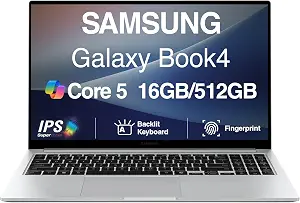
Best Budget: The Samsung Galaxy Book4 Business 15.6″ Laptop is the straightforward option for shoppers prioritizing a listed Full HD IPS display and a backlit keyboard. Its display measures 15.6 inches and has a resolution of 1920 x 1080 pixels. The configuration lists a Core 5 120U processor, 16 GB of memory, and 512 GB of storage. At 3.4 lbs, its stated weight may also help shoppers compare portability details across the products in this guide, while leaving the practical feel of carrying it to your own circumstances.
The IPS display, resolution, and backlit keyboard are concrete details to weigh if you expect to read, write, or work with the laptop in different settings. They do not by themselves establish brightness, color behavior, keyboard feel, or suitability for any specific task. Likewise, the processor, memory, and storage tell you what this configuration lists, but not how it handles your particular applications or files. Check whether those specifications match your intended use rather than treating any one item as a universal measure of value.
The Best Budget label is an editorial designation among these three products, not a statement about market-wide prices or a claim that this model is currently discounted. For Black Friday, compare the exact Galaxy Book4 Business configuration in the offer with the specifications that matter to you. A seasonal deal headline cannot establish that the listing has the same processor, memory, storage, or display details. This model could suit a buyer whose priorities include its stated Full HD IPS screen, backlit keyboard, and 3.4 lbs weight. If Wi-Fi 7, a convertible form factor, or a 3K display ranks higher on your list, consider those requirements separately and check the corresponding product’s details before making a decision.
Samsung Galaxy Book4 Edge Business Laptop (ASIN B0F66TLWMX)
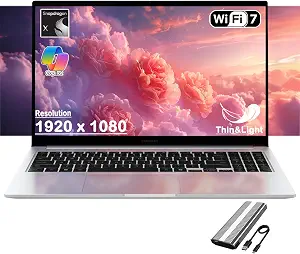
Best Overall: The Samsung Galaxy Book4 Edge Business Laptop is a considered starting point for shoppers who want a balanced set of listed essentials. Its Qualcomm Snapdragon X processor is paired with 16 GB of memory and 512 GB of storage. The display is 15.6 inches with a resolution of 1920 x 1080 pixels, and the listed operating system is Windows 11 Home. Those details give you a useful configuration to compare against your own requirements without implying how it will perform in a particular workload.
Its Wi-Fi 7 specification is another clear point of distinction in this lineup. If wireless capability is part of your decision, confirm that the exact listing you are considering identifies this Galaxy Book4 Edge Business model and includes the same specification. The product facts do not establish how a particular network setup will perform, so treat Wi-Fi 7 as a listed feature rather than a guarantee about speed or coverage. The same careful reading applies to the processor, memory, storage, display, and operating system: each can inform your shortlist, but your own software and work requirements determine whether the configuration suits you.
The Best Overall label is an editorial pick among the products in this guide, grounded in the Edge’s listed processor, memory, storage, display, and Wi-Fi 7. It does not mean the model has been tested against every alternative or is best for every buyer. During Black Friday, compare the exact model name and specification details on the offer you are considering; do not assume that seasonal wording means another configuration is identical. This option merits a place on a general-purpose shortlist if its listed Windows 11 Home system and other details align with what you need. If a backlit keyboard, an IPS display, a convertible design, or a higher-resolution display is central to your choice, compare those specific details against the other featured Samsung laptops before deciding.
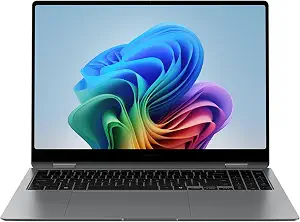
Best for Convertible Use: The Samsung 16” Galaxy Book5 Pro 360 is the choice in this group for shoppers who specifically want a convertible form factor. Its listed processor is Intel Core Ultra 7 258V, with 32 GB of memory and 1 TB of storage. The display specification is 3K Native Resolution 2880 x 1800 pixels, and the listed operating system is Windows 11 Pro. These details distinguish its configuration from the two Galaxy Book4 business models without establishing that it is the right fit for every workload.
The convertible designation is the key starting point for deciding whether this model belongs on your shortlist. Consider whether the ability implied by that form-factor category matters to your intended routine, and verify the exact product description for the details you require. The provided specifications do not establish additional included accessories or particular convertible-use features, so avoid assuming them. The 3K display resolution, memory, storage, processor, and Windows 11 Pro listing offer further points to compare against your needs. The listed battery capacity is 76 watt-hours; that figure alone does not establish runtime.
The Best for Convertible Use label reflects the product’s stated form factor, not a measured comparison or a guarantee about how it will work for you. It also lists Thunderbolt 4 and USB 3.2 Gen 2 as hardware interfaces. If those connection standards matter for your setup, check the exact listing and your requirements rather than assuming details not included here. During Black Friday, verify that any offer is for this Galaxy Book5 Pro 360 configuration, including its processor, memory, storage, display resolution, and operating system. The higher-detail specification set may be worth considering when those listed features align with your priorities; compare the full configuration, not simply the model family or seasonal language.
Key specs
Processor
Intel Core Ultra 7 258V
Memory
32 GB
Storage
1 TB
Display
3K Native Resolution 2880 x 1800 pixels
Operating system
Windows 11 Pro
Form factor
Convertible
Battery capacity
76 watt-hours
Hardware interface
Thunderbolt 4, USB 3.2 Gen 2
Begin with the moments you want the laptop to handle
Before comparing Samsung laptop listings, write down the everyday situations that will shape your choice. You might spend much of your time reading and writing, move between work areas, or want a convertible form factor as part of your routine. These are prompts for ranking priorities, not assumptions about what any particular model can do. Once you have a short list, connect each priority to a specification that is actually provided. For instance, the Galaxy Book4 Business lists an IPS display and a backlit keyboard, while the Galaxy Book5 Pro 360 is identified as convertible. Decide which of those facts is relevant rather than treating every specification as equally important.
This approach is useful when Black Friday listings present several Samsung models beside one another. A product title may emphasize a family name, but your decision should account for the exact model and its listed configuration. Keep an unresolved-requirements note too: if you need a detail that is not included in the product facts, look for confirmation in the listing before committing. That is more dependable than filling in the gaps from a model name or from assumptions about a product category. A practical shortlist can be small: choose the configurations whose stated details match your top needs, then compare the remaining tradeoffs.
Decide what the screen specification tells you
Screen size, resolution, and display type describe different aspects of a laptop’s display, so consider them separately. The two Galaxy Book4 listings specify a 15.6-inch display with a resolution of 1920 x 1080 pixels; the Business model also identifies its display as IPS. The Galaxy Book5 Pro 360 lists a 3K Native Resolution of 2880 x 1800 pixels. Those facts let you distinguish the stated configurations, but they do not establish brightness, color accuracy, surface finish, or how a screen will look in your own surroundings.
Think about what you read or view and where you expect to use the device, then identify which provided screen details help answer your questions. If the IPS specification matters to you, note that it is listed for the Galaxy Book4 Business rather than assuming it applies to another model. If resolution is a priority, compare the exact wording on the listing with the configuration in your shortlist. Black Friday can make different products appear interchangeable when they share a family name or similar title. Confirm the full model and display specification before comparing the offer, and seek clarification for any screen attribute that the available facts do not resolve.
Set a sensible expectation for memory and storage
Memory and storage are useful comparison points, but their value depends on your own applications and files. The Galaxy Book4 Business and Galaxy Book4 Edge Business each list 16 GB of memory and 512 GB of storage. The Galaxy Book5 Pro 360 lists 32 GB of memory and 1 TB of storage. That makes the listed capacities easy to compare, but it does not establish how much space your personal files will use or what amount of memory a specific task needs. Start by considering your actual habits instead of assuming that a larger figure automatically makes a particular model the best choice.
Make a simple inventory of what you expect to keep locally and which applications matter to you, then check whether you need more information to judge fit. Do not infer upgrade options, expansion, or performance from the capacity figures; those details are not established here. During Black Friday, verify that the offer’s selected configuration matches the memory and storage you intended to compare. Product pages can display variations under a shared family name, so read the specifications attached to the exact item rather than relying on a short headline. If capacity remains a concern, treat it as an open question to resolve from the listing before purchase.
Compare processors and operating systems without guessing
The processor names are another way to distinguish these configurations: the Galaxy Book4 Business lists Core 5 120U, the Galaxy Book4 Edge Business lists Qualcomm Snapdragon X, and the Galaxy Book5 Pro 360 lists Intel Core Ultra 7 258V. These names identify the processors provided in the product facts; they do not, on their own, demonstrate how the laptops compare in speed or suitability for a particular application. If your work depends on specific software, check its requirements and confirm the details you need for the exact model rather than relying on a processor label alone.
The listed operating systems also differ. The Galaxy Book4 Edge Business specifies Windows 11 Home, while the Galaxy Book5 Pro 360 specifies Windows 11 Pro. No operating system is provided in the facts for the Galaxy Book4 Business, so do not assume one based on the other models. For Black Friday, treat processor and operating-system details as configuration checks, especially if you have requirements for your intended setup. If a listing does not answer a question you consider essential, leave that point unresolved until you can verify it. This keeps a seasonal offer from distracting you from the configuration you actually need.
Check the practical details the listing actually names
Some useful distinctions are specific rather than universal. The Galaxy Book4 Business lists a backlit keyboard and a weight of 3.4 lbs. The Galaxy Book4 Edge Business lists Wi-Fi 7. The Galaxy Book5 Pro 360 lists a 76 watt-hour battery capacity and Thunderbolt 4 and USB 3.2 Gen 2 hardware interfaces. These facts can guide follow-up questions: whether a backlit keyboard matters to you, whether Wi-Fi 7 belongs in your requirements, or whether the named interfaces match what you intend to connect.
Do not turn a specification into a promise it cannot support. A listed battery capacity is not a runtime estimate, and a wireless standard does not guarantee performance in a particular network environment. The provided connection details also do not establish every port or accessory included. When comparing Black Friday options, check that the exact product and configuration include the detail you care about, and confirm any unanswered setup requirements separately. Then weigh that verified information against your priorities. This final check helps distinguish a genuine match for your needs from a listing that merely looks appealing because of a seasonal label.
Make your Black Friday choice
The best Samsung laptop for your shortlist is the one whose confirmed configuration fits your priorities. The Galaxy Book4 Edge Business is the Best Overall editorial pick here, the Galaxy Book4 Business is labeled Best Budget, and the Galaxy Book5 Pro 360 is Best for Convertible Use; each label applies only among these featured choices. Before a Black Friday purchase, match the exact model to the specifications you care about and resolve important unknowns rather than assuming. Compare the complete offer and configuration, not just the seasonal wording. A careful check makes it easier to choose on evidence and leave unsupported promises out of the decision.