Best Laptop Memory Buying Guide — Black Friday Deals 2026
Are you replacing a laptop’s existing memory, or trying to choose an upgrade before a Black Friday listing catches your eye? Start with what the laptop can accept, then compare memory generation, capacity, module layout, and speed. The products here cover two different lanes: DDR5 and DDR4. They also range from an 8GB option to 32GB kits, so the right pick depends on both your computer and your intended upgrade. Treat Black Friday as a chance to compare the exact product and configuration, not as a reason to skip compatibility checks. peakaboo’s picks below make those differences easier to assess without assuming that any one memory kit fits every laptop.
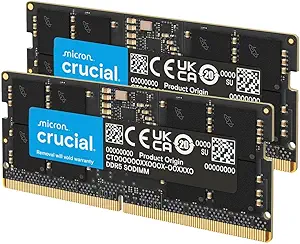
Crucial 32GB DDR5 RAM Kit (2x16GB), 5600MHz (or 5200MHz or 4800MHz) Laptop Memory 262-Pin SODIMM, Compatible with Intel Core and AMD Ryzen 7000, Black – CT2K16G56C46S5
Crucial 32GB DDR5 RAM Kit (2x16GB), 5600MHz (or 5200MHz or 4800MHz) Laptop Memory 262-Pin SODIMM, Compatible with Intel Core and AMD Ryzen 7000, Black – CT2K16G56C46S5 (ASIN B0BLTDRRLF)
Best Overall is the label for this Crucial kit among the products in this guide, not a claim of tested or market-wide superiority. Its central distinction is a 32GB DDR5 configuration made up of two 16GB modules. That gives shoppers who have already confirmed their laptop uses compatible DDR5 SODIMM memory a two-module kit to consider. DDR5 is not interchangeable with DDR4, so the label alone is no reason to choose it over the DDR4 options. Check the laptop’s documentation and the exact Amazon listing before making a Black Friday purchase.
The listed speed modes are 5600MHz, 5200MHz, or 4800MHz; the product name also identifies these as alternatives, not a promise that every laptop will use the highest figure. The listing specifies a 262-pin SODIMM form factor, 1.1V voltage, CL46 latency, and non-ECC memory. These details help you match a product to your laptop’s requirements, but they are not substitutes for confirming those requirements. The facts identify this kit as best for 12th Gen Intel Core and AMD Ryzen 7000 Series processors. Keep that qualification in view alongside the form factor and DDR5 generation.
This is a sensible candidate for someone seeking 32GB in a DDR5 kit and whose laptop’s specifications align with the listing. It is not the choice for a DDR4-only laptop, and a listed processor family should not be treated as a universal compatibility guarantee. For Black Friday, compare the exact model, CT2K16G56C46S5, and the selected listing variant with the configuration you intend to buy. If the laptop’s supported memory type or speed is unclear, pause to verify it first. The Best Overall label is a guide to this article’s shortlist; the useful decision is whether this kit’s documented DDR5 configuration matches your own device.
Key specs
Kit capacity
32GB DDR5 RAM laptop memory kit (2x16GB)
Memory speed
operates at 5600MHz, 5200MHz, or 4800MHz
Form factor
Form Factor = SODIMM
Pin count
Pin Count = 262-Pin
Voltage
Voltage = 1.1V
Latency
Column Address Strobe Latency 46
Error correction
ECC Type = Non-ECC
Processor compatibility
Best for 12th Gen Intel Core and AMD Ryzen 7000 Series processors
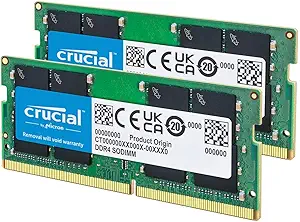
Crucial 32GB DDR4 RAM Kit (2x16GB), 3200MHz (PC4-25600) CL22 Laptop Memory, SODIMM 260-Pin, Downclockable to 2933/2666MHz, Compatible with 13th Gen Intel Core and AMD Ryzen 7000 –
Crucial 32GB DDR4 RAM Kit (2x16GB), 3200MHz (PC4-25600) CL22 Laptop Memory, SODIMM 260-Pin, Downclockable to 2933/2666MHz, Compatible with 13th Gen Intel Core and AMD Ryzen 7000 – (ASIN B08C4X9VR5)
Best for a 32GB DDR4 kit is the clearest fit for this Crucial option: its listed capacity is 32GB in a two-module arrangement of 2x16GB, and it uses DDR4 rather than DDR5. That distinction can quickly narrow the choice for shoppers whose laptop calls for DDR4 SODIMM memory. It should not be selected simply because its capacity matches a desired upgrade; the laptop must also support the memory generation, form factor, and other relevant specifications. Before a Black Friday purchase, use the laptop’s own documentation to establish those requirements and compare them with the exact listing.
The kit is rated for 3200MHz and is also listed as able to operate at 2933MHz or 2666MHz. Its form factor is 260-pin SODIMM, with 1.2V voltage, CL22 latency, and non-ECC memory. Read these as a set: capacity alone does not establish whether the kit is appropriate for a particular laptop. The product name also describes it as downclockable to the lower listed speeds, while the facts identify the kit as laptop-compatible. Those details can help shoppers compare it with another DDR4 option, but the supported memory configuration of the laptop remains the deciding reference.
This is a focused choice for a shopper looking specifically for a 32GB DDR4 kit rather than a DDR5 kit or an 8GB option. Its editorial label identifies that role among the products here; it does not establish a price advantage. During Black Friday, make sure the listing still shows the intended 2x16GB DDR4 kit and not another configuration. If the laptop’s documentation calls for DDR5, this DDR4 product is not the matching generation. If it calls for DDR4, continue checking the pin count, speed support, and capacity limits before deciding. Matching those details is more useful than judging the product by a headline or event label.
Key specs
Memory kit
32GB DDR4 laptop memory RAM kit (2x16GB) that operates at 3200MHz, 2933MHz, 2666MHz
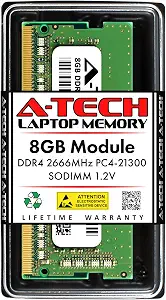
Best Budget is the supplied editorial label for this A-Tech option, which lists 8GB of DDR4 laptop memory. The label does not promise a particular price or discount. Instead, this product’s defining fit in the shortlist is its listed capacity: it gives shoppers who specifically want an 8GB option a different starting point from the 32GB kits. Whether that amount suits an upgrade depends on the laptop’s current setup and what the owner wants to achieve. Check the laptop’s capacity requirements and upgrade plan rather than assuming that any one amount is right for every user.
The listed specifications are DDR4, 2666 MHz, SO-DIMM, 260 pins, 1.2 volts, and CL19 latency. It is described as non-ECC unbuffered memory. This is a different configuration from the two 32GB products, and those products also include different memory generations or speeds. Do not infer that this A-Tech part can replace either kit in a laptop without checking the laptop’s requirements. Its DDR4 type and SODIMM form factor are particularly useful identifiers to compare with the existing or supported memory configuration.
For Black Friday, the practical reason to consider this pick is a specific need for the listed 8GB DDR4 configuration—not an assumption that the event makes it the least expensive option. Verify the exact product, capacity, and specifications on the listing, then compare them with the laptop’s support information. The Best Budget label is an editorial category for this guide, not a measured value claim. If you need a 32GB kit, one of the Crucial products is the more direct match by listed capacity; if you need DDR5, neither the 8GB capacity nor the DDR4 type makes this the matching product. Let the laptop’s requirements and your intended capacity settle the choice.
Key specs
Capacity
RAM Size 8 GB
Memory type
RAM Memory Technology DDR4
Speed
Memory Speed 2666 MHz
Form factor
Form Factor SO-DIMM
Pin count
Number of Pins 260
Voltage
Voltage 1.2 volts
Latency
Column Address Strobe Latency CL19
Memory type details
Non-ECC Unbuffered
First identify the memory generation your laptop supports
Make DDR4 versus DDR5 the first filter. The products in this guide are not interchangeable just because they are all described as laptop memory. The Crucial CT2K16G56C46S5 is a DDR5 kit, while the Crucial B08C4X9VR5 and A-Tech B07KGMBL93 are DDR4 options. Look up the laptop’s exact model and consult its documentation or support information for the supported memory generation before comparing event listings. If that information is unclear, resolve the uncertainty before ordering rather than relying on a product name that mentions a processor family.
The listed processor information can help narrow a search, but it does not replace checking the specific laptop. The DDR5 kit is identified as best for 12th Gen Intel Core and AMD Ryzen 7000 Series processors. Processor generations and laptop memory configurations are not the same thing; confirm the memory type supported by the actual device. For Black Friday, open the exact product listing and check that it is the generation you meant to buy. A prominent speed or capacity can distract from a generation mismatch, so treat generation as a pass-or-pause decision before weighing other features.
Choose a capacity with the intended upgrade in mind
The selection here offers two 32GB kits and one 8GB option. The Crucial DDR5 kit and Crucial DDR4 kit each list 32GB total, arranged as 2x16GB. The A-Tech product lists 8GB; its supplied facts do not specify a two-module arrangement. Decide what capacity you are seeking, then compare that target with the laptop’s supported configuration and the exact listing. Don’t assume that an amount is suitable simply because it appears in a product title or matches a general upgrade idea.
Think through the job the memory purchase is meant to do: replace a current configuration, expand it, or supply a particular capacity. The laptop’s existing memory and its upgrade limits matter to that decision, so check the documentation rather than guessing at module arrangements or supported maximums. During Black Friday, confirm the selected product still describes the capacity you intended. A sale headline cannot tell you whether a given kit fits your plan. The useful comparison is between your laptop’s requirements, the capacity you need, and the exact configuration being offered.
Treat module layout and laptop form factor as fit checks
All three products are identified as laptop memory in a SODIMM or SO-DIMM form factor, but their listed pin counts differ by generation: the Crucial DDR5 kit specifies 262 pins, while the two DDR4 products specify 260 pins. Use the laptop’s specifications to confirm the required form factor and pin count; do not choose based on the general word “laptop” alone. These details are practical filters, not cosmetic distinctions. If they do not align with the device requirements, move on to another option instead of assuming the parts will fit.
Module layout deserves its own check. Both Crucial kits are described as 2x16GB, which makes their two-module arrangement explicit. The A-Tech product is listed as 8GB, but the supplied information does not state a module count. Avoid filling in that gap by assumption. When comparing Black Friday variants, check that the listing’s capacity and arrangement are the ones you intended to purchase. Also consult the laptop documentation for any relevant configuration limits. Getting these points right matters more than choosing a familiar brand name or a headline that emphasizes capacity.
Read speed, voltage, and latency as supporting details
Speed figures should be read alongside the laptop’s support information. The DDR5 Crucial kit lists operation at 5600MHz, 5200MHz, or 4800MHz; the DDR4 Crucial kit lists 3200MHz, 2933MHz, or 2666MHz; and the A-Tech DDR4 option lists 2666 MHz. These are product specifications, not a guarantee of the speed a particular laptop will use. For a Black Friday comparison, check which speeds the laptop supports and make sure you are looking at the intended product configuration.
Other listed details can help distinguish the products once generation, capacity, and fit are settled. The DDR5 Crucial kit specifies 1.1V and CL46; both DDR4 products specify 1.2 volts, with CL22 for the Crucial kit and CL19 for A-Tech. The Crucial products are listed as non-ECC, and the A-Tech memory is described as non-ECC unbuffered. These figures are not enough on their own to declare one option better for every laptop. Use the full specification set to check suitability, and give priority to what the device requires.
Compare the exact Black Friday listing before checkout
Treat Black Friday as a moment to compare listings carefully, not as proof that a particular product is discounted or that a deal is worthwhile. Confirm the model identifier, DDR generation, capacity, module layout, form factor, pin count, and listed speed. For the Crucial DDR5 kit, that includes checking for CT2K16G56C46S5 and the 32GB 2x16GB configuration. For the DDR4 Crucial kit, confirm the 32GB 2x16GB configuration; for the A-Tech product, confirm the listed 8GB DDR4 specification. Similar-looking options can have distinct configurations.
Before placing an order, compare the exact variant displayed with the memory your laptop supports and the capacity you want. Do not infer a price, discount, stock status, or seller policy from the product details in this guide. If a listing page presents choices, ensure the selected choice is the one you evaluated, rather than assuming every variant shares the same specifications. A calm final check can prevent a tempting event headline from steering you toward the wrong generation or capacity. If a key detail remains uncertain, verify it before buying.
Make your Black Friday choice
A good laptop memory choice begins with the laptop, not the Black Friday banner. Confirm the supported generation and form factor, decide whether the listed capacity and module layout suit your plan, then check speed and supporting specifications against the device documentation. The Crucial DDR5 kit is the 32GB DDR5 option; the Crucial DDR4 kit is the 32GB DDR4 choice; and the A-Tech listing is the 8GB DDR4 option. Before checkout, verify the exact model and selected variant. That checklist makes the final comparison specific to your laptop, without assuming a promotion or a universal best fit.