Best Lenovo Laptop Buying Guide — Black Friday Deals 2026
A Lenovo laptop shortlist makes more sense when it starts with the day you want the computer to handle: gaming, business work, or straightforward everyday tasks. These three configurations take noticeably different approaches, so the family name alone is not enough to guide a choice. The LOQ combines a dedicated NVIDIA GeForce RTX 5060 with a high-refresh-rate display; the ThinkPad T14 focuses on business-oriented details such as Windows 11 Pro and a fingerprint reader; and the V15 pairs an Intel N100 processor with a more modest memory and storage configuration. During Black Friday, compare the exact model and configuration shown in an offer with the work you expect to do. A deal is useful only if its listed features fit your routine.
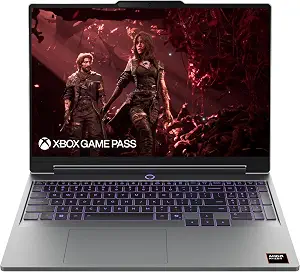
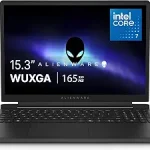
For a shopper whose main priority is gaming, the Lenovo LOQ gives the shortlist a clear starting point. It is listed with an NVIDIA GeForce RTX 5060, a Ryzen 7 250 processor, 16GB Memory, and 1TB Storage. Those named components make this the gaming-focused option among these three listings; they do not, by themselves, establish how any particular game will run. Think about the games and other applications you plan to use, then decide whether this type of configuration matches that purpose. Its Best Overall label is an editorial choice within this guide, not a claim that it is the best laptop for every buyer.
The screen description is another practical part of the decision. The LOQ has a 15.3″ WUXGA IPS Display and a 165Hz Refresh Rate. If smooth motion is high on your personal priority list, that refresh-rate figure is worth comparing against the display details of other configurations you are considering. The screen size and WUXGA resolution also give you concrete details to check against your preferred viewing setup. On Black Friday, compare the exact LOQ configuration in the offer rather than assuming every listing with the same family name has these same specifications.
Capacity deserves a closer look before choosing it for a mix of games, everyday tasks, and saved files. The listing specifies 16GB Memory and 1TB Storage, so you can weigh those amounts against your own applications and storage habits. Windows 11 Home is the stated operating system. If you need a particular program, peripheral, or workflow, verify its requirements separately rather than treating the laptop name as proof of compatibility. That check is useful whether you are shopping in advance or evaluating a Black Friday offer.
The listed battery life is 8.5 hours. Treat that as a specification to consider alongside how and where you expect to use the laptop, rather than a guarantee for every routine. Luna Grey is the listed color. For a shopper who wants a gaming-centered Lenovo with a named graphics card, fast-refresh display, and stated memory and storage, the LOQ is the most directly aligned choice in this group. During Black Friday, confirm that the configuration offered is the one with the features you used to make your shortlist.
Key specs
Graphics
NVIDIA GeForce RTX 5060
Display
15.3″ WUXGA IPS Display
Refresh rate
165Hz Refresh Rate
Processor
Ryzen 7 250
Memory
16GB Memory
Storage
1TB Storage
Operating system
Windows 11 Home
Battery life
8.5 hours
Lenovo ThinkPad T14, Intel Ultra 5 255U, Laptop Computer for Business
Lenovo ThinkPad T14, Intel Ultra 5 255U, Laptop Computer for Business (ASIN B0HKMPWPVV)
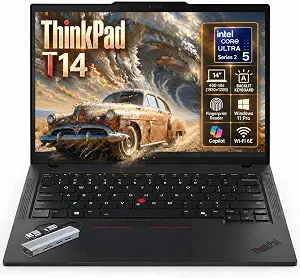
For a work-focused shortlist, the Lenovo ThinkPad T14 puts business-oriented details in view. Its listed processor is Intel Ultra 5 255U, and it has a 14-inch WUXGA (1920×1200) IPS display with an anti-glare coating. The display information can help you judge whether its size and finish suit the way you expect to read and work. Windows 11 Pro is the stated operating system, while a touch-style fingerprint reader integrated in the power button with Match-on-Chip technology is the standout security feature in this listing. That makes Best for business security features an appropriate editorial label among these options, not a measured ranking or a promise about any organization’s security needs.
Consider the memory specification carefully: this configuration lists 8GB DDR5-5600 SODIMM RAM. Compare that amount with the requirements of the applications you expect to run, and check any workplace or personal software requirements before deciding. The listing also specifies a backlit English keyboard, a practical detail to weigh if you often work in settings where keyboard lighting matters to you. These concrete details help separate questions about your daily routine from assumptions based only on the ThinkPad name.
Connectivity can shape a work setup as much as the display or operating system. The T14 listing includes 2x Thunderbolt 4/USB4 40Gbps ports. Consider the devices and connection needs in your own workspace, then confirm that the listed ports meet those needs. Do not assume that an unlisted accessory or capability is included; check its requirements independently. This is particularly useful when comparing Black Friday listings, since a similar product name does not establish that every configuration has the same ports or memory.
The T14 is a sensible candidate to examine if Windows 11 Pro, the specified fingerprint-reader feature, and the listed port details are central to your decision. Its 14-inch display and anti-glare coating provide further points for matching the laptop to your working environment. Before acting on a Black Friday offer, verify that the exact configuration includes the details that matter to you, especially the memory amount, operating system, and security feature. That self-check is more useful than treating the editorial label as a substitute for your own requirements.
Key specs
Display
14-inch WUXGA (1920×1200) IPS display
Memory
8GB DDR5-5600 SODIMM RAM
Operating system
Windows 11 Pro
Security
touch-style fingerprint reader integrated in power button with Match-on-Chip technology
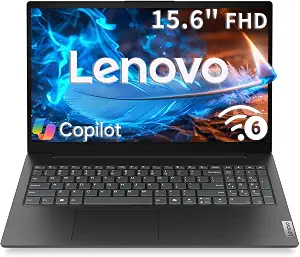
The Lenovo V15 is the budget-oriented pick in this group, with a configuration that keeps the key decisions easy to identify. It lists an Intel N100 processor (4 cores / 4 threads, up to 3.4GHz, 6MB Intel Smart Cache), 8GB SODIMM DDR5-4800 memory, and a 256GB PCIe 4.0×4 NVMe SSD. Windows 11 Home is the stated operating system. Best Budget is the supplied editorial label for this product among the three featured choices; it is not a claim about market-wide value or a guarantee of a particular price. During Black Friday, judge any offer by the precise configuration and your intended workload, not the label alone.
Its screen is a 15.6″ FHD (1920×1080) TN anti-glare display. That description gives you a useful checklist for deciding whether the screen size, resolution, and panel type suit your typical tasks and viewing preferences. If display characteristics are especially important to you, compare those exact details with the alternatives you are considering instead of relying on a broad FHD description. The anti-glare finish is another listed point to consider when thinking about where you generally use a laptop.
For day-to-day planning, match the stated memory and storage to your own software and file habits. The V15’s 8GB SODIMM DDR5-4800 memory and 256GB PCIe 4.0×4 NVMe SSD are specific amounts and types to compare against application requirements and the space you expect to need. This is a useful step before deciding whether a budget-focused configuration is the right fit; the product name alone cannot answer that question. The listing also gives Wi-Fi 6 (802.11ax 2×2) and Bluetooth 5.2 as wireless connectivity details. Check your own connection needs against those specifications.
The stated weight is 1.51kg (3.33 lb), which can help you assess whether the laptop’s listed weight suits your carrying plans. Consider that alongside the 15.6″ display and your usual routine, rather than assuming a size or weight will feel right for everyone. On Black Friday, verify that the offer corresponds to the V15 with the processor, memory, storage, display, and wireless details described here. For a shopper whose priorities align with those specifications, it is the straightforward budget-labeled option in this guide.
Key specs
Processor
Intel N100 processor (4 cores / 4 threads, up to 3.4GHz, 6MB Intel Smart Cache)
Memory
8GB SODIMM DDR5-4800 memory
Storage
256GB PCIe 4.0×4 NVMe SSD
Operating system
Windows 11 Home
Display
15.6″ FHD (1920×1080) TN anti-glare display
Wireless connectivity
Wi-Fi 6 (802.11ax 2×2) and Bluetooth 5.2
Weight
1.51kg (3.33 lb)
Choose the configuration around your actual workload
Begin by naming the activity that would make a laptop feel like the right purchase. If gaming is the priority, the LOQ is the only option here explicitly presented as a gaming laptop, and its listed NVIDIA GeForce RTX 5060 and 165Hz Refresh Rate give you concrete specifications to weigh. If business details are more important, the ThinkPad T14 lists Windows 11 Pro, a fingerprint reader, and Thunderbolt 4/USB4 ports. If your shortlist is centered on the V15’s budget label, focus on whether its Intel N100 processor, 8GB memory, and 256GB SSD match the applications and files you expect to handle.
This does not require guessing at future performance. Write down the programs you expect to use, any requirements supplied by their makers, and the tasks that matter most to you. Then compare those requirements with the listed specifications. A gaming title, office workflow, or general-purpose routine can call for different priorities, so avoid choosing by one impressive-sounding feature in isolation. A Black Friday search can produce tempting variations of a model name; keep your shortlist tied to the exact configuration and intended use rather than broad product-family wording.
Read a Black Friday offer as a specific configuration
A Black Friday offer should be compared as a complete product configuration, not just as a Lenovo name or a headline. Check the processor, memory, storage, display description, and operating system against the version you meant to consider. For the LOQ, that means confirming the listing includes its stated Ryzen 7 250, 16GB Memory, 1TB Storage, NVIDIA GeForce RTX 5060, and 165Hz Refresh Rate. For the ThinkPad T14 or V15, compare their own listed specifications rather than assuming that similarly named laptops share the same setup.
Make a short personal checklist before opening listings. Put must-have requirements at the top and preferences underneath. If the offer details do not clearly answer a question that matters to you, seek clarification from the listing rather than filling in the gap yourself. Do not assume a discount, bundle, or included feature from a Black Friday label. Compare the exact offer details available to you and decide whether the specified configuration is worth considering for your needs. This makes the seasonal search more deliberate and helps keep attention on fit, not just promotional wording.
Let screen details influence where you plan to work
Display descriptions are more useful when connected to your own habits. The LOQ lists a 15.3″ WUXGA IPS Display with a 165Hz Refresh Rate, while the ThinkPad T14 lists a 14-inch WUXGA (1920×1200) IPS display with an anti-glare coating. The V15 lists a 15.6″ FHD (1920×1080) TN anti-glare display. Those are distinct descriptions to compare, not a basis for assuming how a screen will look in every room or to every viewer.
Ask yourself how you typically use a laptop: whether you favor a particular screen size, whether an anti-glare coating matters in your usual setting, and whether the refresh-rate specification is relevant to your intended work or play. If you have a strong preference, make it a deciding criterion rather than an afterthought. During Black Friday, check the display details on the exact listing, especially when browsing offers that use similar model names. A careful comparison helps you choose from the specifications actually provided instead of relying on a vague screen-size or resolution shorthand.
Match memory and storage to your everyday demands
Memory and storage describe different parts of the decision, so consider each in light of your own routine. The LOQ lists 16GB Memory and 1TB Storage. The ThinkPad T14 lists 8GB DDR5-5600 SODIMM RAM, and the V15 lists 8GB SODIMM DDR5-4800 memory and a 256GB PCIe 4.0×4 NVMe SSD. These specifications let you compare the configurations, but they do not say how much capacity your particular software or collection of files will require.
Check application requirements and think about the files you expect to keep on the laptop. If you have a work or school software list, use its stated requirements as a reference; if you manage many local files, consider the storage amount in relation to your own habits. Do not assume that a component can be upgraded or that a certain program will run well unless you have verified that separately. A Black Friday decision is clearer when capacity is treated as a personal fit question, not as a reason to buy a configuration simply because one number looks larger.
Check security, connections, and carrying preferences
For business use, distinguish the features that are actually listed. The ThinkPad T14 specifies Windows 11 Pro and a touch-style fingerprint reader integrated in the power button with Match-on-Chip technology. It also lists a backlit English keyboard and 2x Thunderbolt 4/USB4 40Gbps ports. These details may help you compare the configuration with your workplace routine, but your organization’s policies and device requirements should guide the final choice. Do not treat an individual feature as proof that the laptop satisfies every security or connection need.
Your surroundings and travel habits matter too. The V15’s listing includes Wi-Fi 6 (802.11ax 2×2), Bluetooth 5.2, and a stated weight of 1.51kg (3.33 lb). The LOQ lists Windows 11 Home and battery life of 8.5 hours. Use these details as points to check against your own plans, not as guarantees about a particular day or setup. When weighing Black Friday options, identify which listed details would genuinely change your experience, then verify those details on the exact configuration before choosing.
Make your Black Friday choice
There is no single right Lenovo laptop for every routine in this guide. The LOQ is the gaming-focused Best Overall choice here, the ThinkPad T14 is the Best for business security features, and the V15 carries the Best Budget label among these three options. Start with your workload, then confirm that the screen, capacity, operating system, and other listed details suit it. During Black Friday, check the exact configuration attached to the offer and avoid assuming that a model name tells the whole story. A careful match between your needs and the stated specifications is a more useful basis for choosing than the seasonal label alone.