Best Printer Buying Guide — Black Friday Deals 2026
A printer makes sense when it matches the work you actually bring home: occasional color pages, regular refills, or batches of documents that need quick handling. This guide compares three options by their stated features, not by assumptions about quality or ownership costs. For Black Friday, treat the listing as a particular configuration: confirm the exact model and included supplies, then decide whether its functions, paper handling, and connection options suit your routine. The right choice depends less on a headline offer than on which tradeoffs you are comfortable managing after purchase.
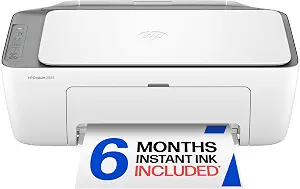
HP DeskJet 2923 Color Inkjet Printer (ASIN B0GMW9XT9X)
Best Budget: The HP DeskJet 2923 is a color inkjet printer with print, copy, and scan functions, plus mobile and wireless printing. Its 60-sheet input tray gives occasional home jobs a clear paper-capacity reference. If you expect to print a mix of documents and color pages, the listed functions bring several common tasks into one device. The stated speeds are up to 7.5 pages per minute in black and 5.5 in color. Those figures describe the printer’s listed maximum speeds; they cannot tell you how long a particular document or image will take in your own setup.
Connection choices include Apple AirPrint, USB, Wi-Fi, wireless direct printing, and Mopria. That range gives you options to weigh against the devices and network you plan to use, without assuming every connection method is necessary for your routine. Duplex printing is manual, with driver support provided, so consider how often you print on both sides and whether managing that process yourself is acceptable. The maximum color resolution is up to 4800 x 1200 optimized dpi under the stated conditions: printing from a computer on selected HP photo papers and with 1200 input dpi. Keep those qualifications in mind when comparing resolution figures; they are not a blanket description of every print job.
The listed dimensions are 11.97″D x 16.73″W x 6.06″H, which you can compare directly with the space you have available. For Black Friday, verify the exact DeskJet 2923 model and the offer’s included items, then judge the package against the tasks you expect to handle. The Best Budget label is an editorial choice among the printers in this guide, not a statement about a sale price or a market-wide ranking. It reflects the appeal of a straightforward feature set that includes color print, copy, scan, and several connection methods; whether it is the best fit for you depends on your routine and the offer details.
Key specs
Functions
Color print, copy, scan, and a 60-sheet input tray, plus mobile and wireless printing
Print speed
Up to 7.5 ppm black, 5.5 ppm color
Connectivity
Apple AirPrint; USB; Wireless (Wi-Fi); Wireless direct printing; Mopria
Duplex
Manual (driver support provided)
Maximum color print resolution
Up to 4800 x 1200 optimized dpi color (when printing from a computer on selected HP photo papers and 1200 input dpi)
Dimensions
11.97″D x 16.73″W x 6.06″H
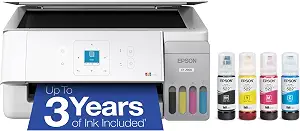
Epson EcoTank ET-2900 Wireless All-in-One Color Supertank Printer
Epson EcoTank ET-2900 Wireless All-in-One Color Supertank Printer (ASIN B0GSSGLV8D)
Best Overall: The Epson EcoTank ET-2900 is a useful starting point if you want a color all-in-one with an ink plan described in terms of longer use rather than a small cartridge supply. Epson says the included ink can last up to three years, with enough to print up to 3,600 black pages and 6,500 color pages. Those are stated maximum included yields, not a promise of how long the ink will last for every household; your own page mix and print habits matter. The supersized tanks and uniquely keyed EcoFit bottles also give you a specific refill approach to consider. If refilling from bottles fits your preferences, those details may be more relevant than a Black Friday headline alone.
The ET-2900 has a 100-sheet paper tray, a high-resolution flatbed scanner, a 1.44-inch color display, and Wi-Fi. Its listed print speeds are 11 black and 6 color ISO pages per minute. These specifications help frame everyday use: the tray provides a defined amount of paper capacity, the flatbed supports scanning, and Wi-Fi provides a wireless connection option. Before choosing it, think about whether its stated features align with the pages you expect to print and whether the ink-tank refill system suits the way you want to manage supplies. The listed facts do not establish print quality for a particular job or your eventual ink use, so avoid treating the maximum yield as a personal forecast.
For Black Friday, check that the offer names the ET-2900 and that the included ink description matches the configuration you intend to buy. Compare the complete package against your needs, including the printer’s stated Wi-Fi connection and paper tray, rather than assuming a deal is worthwhile because of the EcoTank name. This product earns the Best Overall label here as an editorial fit for shoppers weighing color printing, scanning, and a substantial stated included-ink yield together; that label is not a claim of measured superiority or a guarantee that it suits every workload.
Key specs
Ink supply
Epson EcoTank includes enough ink to last up to 3 years
Included ink yield
WORRY-FREE PRINTING — Epson EcoTank comes with enough ink to print up to 3,600 pages black/6,500 color
Ink refill system
Supersized ink tanks and uniquely keyed EcoFit bottles make refilling ink simple
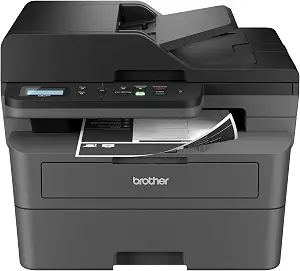
Best for Fast Document Workflows: The Brother DCP-L2640DW is a monochrome multifunction printer whose listed print speed is up to 36 pages per minute. That makes its stated speed a natural point to examine if your queue is mainly text documents and you value a printer specification centered on brisk document output. It also includes a 50-page auto document feeder, which is relevant when scanning or copying a stack of pages is part of your routine. The feeder’s capacity is a concrete handling detail; it does not by itself establish how quickly a particular batch will finish or whether it matches every document job you have.
The DCP-L2640DW offers built-in dual-band wireless at 2.4GHz and 5GHz, plus Ethernet. Auto-Duplex is listed, so automatic two-sided printing is part of its stated feature set. Its maximum media size is 8.5 x 14 inch, and compatible toner is listed as TN830 and TN830XL. Those details can guide practical checks: decide whether the listed media size covers the documents you handle, whether you prefer wireless or Ethernet connection, and whether the named toner models fit the supply plan you are willing to maintain. This is a monochrome option, so consider whether that matches your printing needs before weighing its document-oriented features.
During Black Friday, check the exact model and toner compatibility shown in the listing rather than assuming another Brother device or supply is interchangeable. The Best for Fast Document Workflows label reflects the combination of a stated maximum speed, auto document feeder, and Auto-Duplex—not a claim based on comparative testing. If your everyday jobs are mostly color pages, the Epson or HP may deserve closer consideration instead. If your priority is handling monochrome documents and batches, the Brother’s listed features give you specific points to compare with the offer and your own workflow.
Key specs
Print speed
print speeds up to 36 ppm(2)
Document feeder
A 50-page auto document feeder(4)
Wireless
built-in dual-band wireless (2.4GHz / 5GHz)
Wired connections
Ethernet
Duplex
Auto-Duplex
Maximum media size
8.5 x 14 inch
Compatible toner
TN830, TN830XL
Start with the jobs you expect to repeat
Before looking at Black Friday offers, sort your likely jobs into practical groups: occasional color printing, pages that need copying or scanning, or recurring monochrome document batches. This is not a forecast of how much you will print; it is a way to identify which listed capabilities matter. The HP explicitly lists color print, copy, and scan. The Epson combines color printing with a high-resolution flatbed scanner, while the Brother is a monochrome multifunction model with an auto document feeder. Match those stated details to the tasks you can already anticipate rather than choosing by a broad category label.
Next, consider how you handle paper. A 60-sheet input tray is listed for the HP and a 100-sheet tray for the Epson. The Brother specifies a 50-page auto document feeder and automatic duplexing, which speak to document handling rather than input-tray capacity. These are different features, so do not treat them as interchangeable measures. Ask whether your routine involves loading paper, scanning a stack, or printing on both sides. For Black Friday, use those answers to narrow the shortlist before comparing the exact offer; a feature only adds value if it addresses work you actually expect to do.
Think through the supply approach before the sale
The Epson makes its ink system a central part of the buying decision. Its listing describes supersized tanks, uniquely keyed EcoFit bottles, included ink said to last up to three years, and stated yields of up to 3,600 black pages and 6,500 color pages. Treat those as the product’s stated maximums, not a personalized estimate. Your page mix and printing habits determine whether the included supply description feels relevant. The facts provided do not establish the cost of later refills or how long a specific buyer’s ink will last, so leave those questions open when assessing the overall fit.
For the HP and Brother, the supplied details identify the printer type and, for Brother, compatible toner models TN830 and TN830XL. They do not provide a full long-term supply-cost comparison. Avoid filling that gap with assumptions during Black Friday shopping. Instead, confirm what the specific offer says is included and check the exact model and supply information in the listing. If you expect frequent printing, make supply planning part of your decision; if your use is occasional, weigh the listed functions and handling features alongside it. A headline offer cannot establish which supply approach will suit you best.
Match the connection to your devices and room
Connection options vary across these listings, so start with the method you actually want to use. The HP lists Apple AirPrint, USB, Wi-Fi, wireless direct printing, and Mopria. The Epson lists Wi-Fi. The Brother lists dual-band wireless at 2.4GHz and 5GHz as well as Ethernet. These details let you compare the options on paper, but they do not establish how a particular network or device will behave in your home. If you have a preferred connection method, check that it appears in the listing for the exact printer before you buy.
Placement is another practical check. The HP’s stated dimensions are 11.97″D x 16.73″W x 6.06″H, so measure your intended space against those figures in the same format. No dimensions are supplied here for the other two models, so do not assume they occupy more or less room. For Black Friday, resist treating a familiar product name as a substitute for a fit check. Confirm the model, connection features, and any configuration details in the offer. A printer that supports your intended setup is a more grounded choice than one selected solely for a broad feature list.
Read speed and paper handling in context
Speed figures are useful only when you keep their stated context. The HP lists up to 7.5 pages per minute in black and 5.5 in color; the Epson lists 11 black and 6 color ISO pages per minute; and the Brother lists speeds up to 36 pages per minute. These figures use different descriptions, and the supplied details do not establish that a particular real-world job will run at those rates. Use them as specifications to consider, not as a guarantee of how long a document will take.
Paper and feeding features can matter as much as the speed line. The Brother’s 50-page auto document feeder and Auto-Duplex may be relevant if your routine includes document batches and two-sided printing. The HP specifies manual duplex with driver support, while the Epson lists a 100-sheet paper tray. Consider which task is most common for you: feeding a stack, handling two-sided pages, or keeping paper ready in a tray. When comparing Black Friday configurations, verify the exact features rather than assuming that a deal includes a different accessory or capability.
Compare the exact Black Friday configuration
A Black Friday label does not tell you whether an offer is the right one for your needs. First confirm the exact model name and compare the listed configuration with the features discussed here. Check whether the stated included ink description applies to the Epson offer, whether the HP listing identifies the DeskJet 2923 and its functions, and whether the Brother listing matches the DCP-L2640DW and its compatible toner information. Do not assume that another model in the same product family has the same specifications.
Then compare the offer against your own priorities rather than an imagined universal best. You might value color printing and the HP’s listed copy and scan functions, the Epson’s stated included-ink yield and refill system, or the Brother’s document feeder and automatic duplexing. This guide does not establish a current promotion, price, stock status, or savings. Your final check is therefore the actual listing and its exact terms, alongside the features that matter to your household or work area. That approach keeps the Black Friday decision grounded in evidence instead of urgency.
Make your Black Friday choice
Choose by the routine you want the printer to support. The Epson combines color printing, scanning, Wi-Fi, and a stated high included-ink yield; the HP brings color print, copy, scan, and multiple connection choices; the Brother focuses on monochrome document features, including an auto document feeder and Auto-Duplex. Each offers a different set of reasons to make the shortlist. Before completing a Black Friday purchase, confirm the exact model and offer configuration, then make sure its listed features address work you expect to do. The best fit is the one whose tradeoffs you understand and can live with.