64GB 15.6″ Frameo Digital Picture Frame WiFi (ASIN B0F8B93ZBM)
Best Digital Photo Frame Buying Guide — Black Friday Deals 2026
Where will a digital photo frame sit, and how will new pictures reach it? Those practical questions help narrow the choices before comparing display details. The three options here take different approaches: a Wi-Fi Aura with a touchscreen, a 10.1-inch frame that lists app sharing and several content options, and a larger Frameo model with a Full HD display. Their storage, video and connectivity details also differ, so the right fit depends on your household and the files you want to show. During Black Friday, compare the exact product variant and its listed features rather than assuming a headline deal tells the whole story. This guide explains what each frame offers and what to verify before checkout.
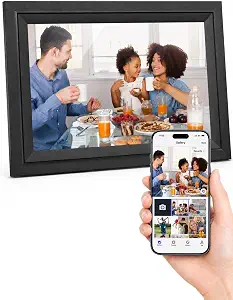
Digital Picture Frame 10.1 Inch WiFi Digital Photo Frame Electronic
Digital Picture Frame 10.1 Inch WiFi Digital Photo Frame Electronic (ASIN B0CYZ7Q53D)
For shoppers who want app sharing and a choice of placement, the Digital Picture Frame 10.1 Inch WiFi Digital Photo Frame Electronic earns the Best Budget label in this selection. It has a 10.1-inch IPS LCD panel with 1280*800 resolution and 16GB of built-in memory. The frame can be placed on a table or hung on a wall in portrait or landscape mode, giving you several ways to fit it into a room. These are practical details to weigh when deciding whether its size, orientation options and storage suit your photo display plans.
The listed sharing route is the Uhale Phone App for iOS and Android. That gives phone users a named app to investigate before buying; check the current listing for setup requirements and confirm that the app-based workflow matches the people who will send photos. The frame supports videos up to 120 seconds, and its listed picture formats are JPG, JPEG, BMP and PNG, with MP4 for video. If your collection includes a particular file type, compare it with that list instead of assuming every image or clip will be supported.
Its built-in 16GB memory is one part of the storage picture. The product details also say it supports playing directly from a micro SD card up to 32GB. That can matter if you prefer keeping files on removable media, but consider how you actually organize and update pictures before treating extra capacity as a deciding factor. The specification describes direct playback from a card; it does not mean you have to use that route if app sharing better suits your routine.
On Black Friday, the Best Budget label is an editorial choice among the featured frames, not a promise about the current price or a claim that it is the least expensive offer. Check the exact listing and variant, then compare the 10.1-inch screen, resolution, built-in memory, Uhale app, video limit and card support with your needs. This model is a sensible match to investigate if you value a named phone app and flexible table-or-wall placement. Be sure the offer you are considering reflects the same frame and listed specifications.
Key specs
Display
10.1 inch IPS LCD panel
Resolution
1280*800
Built-in storage
16GB built-in memory
App sharing
via Uhale Phone App(iOS/Android)
Video limit
videos(Max.120s)
Expandable storage
support to play directly from a max 32GB micro SD card
Placement
on table or hang it on wall in portrait or landscape mode
File formats
Supports picture format by JPG/JPEG/BMP/PNG and video format by MP4.
Aura Digital HD Picture Frame (10″ – Carver Black)
Aura Digital HD Picture Frame (10″ – Carver Black) (ASIN B0GR6YMKHX)
The Aura Digital HD Picture Frame in Carver Black is the Best Overall choice here for shoppers who want a touchscreen in a familiar 10.1-inch format. Its listed features include a WXGA display, Wi-Fi connectivity, a 16:9 aspect ratio and corded electric power. That combination gives you a straightforward starting point if screen interaction and a connected frame matter more to you than a specified internal storage capacity. The provided details do not state storage or a particular photo-sharing method, so check the exact listing for those points before deciding how you will add pictures.
Think about where the frame will go and how often people in the household will interact with it. A touchscreen may suit a shared living area where someone can approach the frame, while the corded power source means placement should account for access to an outlet. Wi-Fi is listed, but that alone does not establish which app, upload workflow or network requirements apply. If sharing photos from phones is central to your plan, confirm those details on the product page rather than assuming the setup will match another Wi-Fi frame.
The WXGA resolution and 16:9 aspect ratio are useful details to consider alongside the photos you plan to display. Before buying, look at the frame’s exact listing and consider whether the described screen format suits the images and room where it will sit. The listed display size is 10.1 inches, making it a different kind of choice from a larger-screen frame if you are deciding how much visual space to devote to photos. No one display format is automatically right for every shelf, desk or room; the intended viewing spot should guide the decision.
For Black Friday, treat Best Overall as an editorial fit label among these three options, not as a claim of test results or market-wide superiority. Compare the exact Carver Black variant shown in the offer with the product details you need: screen, Wi-Fi, touchscreen and corded power are specified here, while storage and sharing particulars are not. Check whether the listing’s current configuration answers your questions before placing an order. This model makes the most sense if its stated interaction and display features align with your priorities, rather than simply because it appears in a deal roundup.
64GB 15.6″ Frameo Digital Picture Frame WiFi (ASIN B0F8B93ZBM)
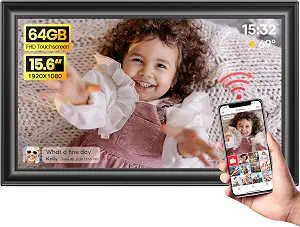
The 64GB 15.6-inch Frameo Digital Picture Frame WiFi is the Best for a larger Full HD display pick in this group. Its IPS Full HD screen is listed at 1920 x 1080, and the product name identifies a 15.6-inch frame. That larger-screen format may suit a spot where photos should occupy more of the room’s visual space, such as a broad shelf or sideboard. Consider the available surface and viewing distance before choosing a frame of this size; the listed approximate dimensions are 15.43 x 9.61 inch.
This model has 64GB of built-in storage and supports JPG, JPEG, BMP and PNG pictures, plus MP4 videos. Its listed Wi-Fi compatibility is limited to 2.4GHz networks, an important detail to check against the network you plan to use. The Frameo app allows phone video uploads of up to 15 seconds. If sending clips is part of the appeal, decide whether that stated limit suits the videos you want to share. The product details specify the phone-upload limit, so do not assume longer clips can be sent through that route.
The listing also says an SD card or USB drive should be in FAT32 format before use. If you intend to use either type of media, check the format of your existing device or files and plan for that requirement. This detail is separate from the frame’s built-in 64GB storage; consider both how much content you want available and how you expect to load it. Matching your routine to the stated app, Wi-Fi and media-format details can prevent a mismatch after delivery.
During Black Friday, compare the exact Frameo variant and its complete feature list rather than focusing only on the screen size or storage figure. The Best for a larger Full HD display label reflects its listed display format and size within this article, not a measured superiority claim. This may be the best fit to investigate if a larger Full HD viewing area is a priority and your Wi-Fi is compatible with the stated 2.4GHz requirement. Check the current listing for the exact configuration, then weigh its app video limit and FAT32 note against the way you plan to add content.
Key specs
Wi-Fi
Only supports 2.4GHz Wi-Fi
Phone video uploads
Frameo app only allows uploading 15-second videos
Built-in storage
built-in 64GB storage
Display
1920 x 1080 IPS Full HD display
Storage format
Please make sure the SD card/USB drive is in “FAT32” format before use.
Supported formats
JPG, JPEG, BMP, PNG, and MP4 videos.
Dimensions
approx. 15.43 x 9.61 inch
Let the room determine the screen choice
Start by picturing the frame in its intended spot, not by choosing the biggest display on a product page. A desk, narrow shelf or bedside table may call for a frame whose footprint feels comfortable there, while a broad surface can make a larger screen easier to accommodate. The Aura and the Uhale model are both listed with 10.1-inch displays; the Frameo model is identified as 15.6 inches and has approximate dimensions of 15.43 x 9.61 inch. Use the exact dimensions and placement details to check the available space.
Resolution and display type are useful parts of that decision, but they do not determine how a frame will look in every room. The Uhale frame lists an IPS LCD panel at 1280*800, the Aura lists WXGA, and the Frameo lists an IPS Full HD display at 1920 x 1080. Compare those specifications with the screen size you want and the photos you expect to show. If image format matters to you, review the aspect ratio listed for the Aura, 16:9, and verify the exact model details for any other aspect-ratio questions.
Placement flexibility can be just as important as screen area. The Uhale product is specifically described for table or wall placement in portrait or landscape mode. Do not assume the same arrangements for another frame unless its exact listing confirms them. On Black Friday, check the variant’s dimensions and stated placement options before comparing offers. A screen that fits the wall or furniture you have in mind is more useful than a feature that does not suit the chosen location.
Choose the content route before counting gigabytes
A frame’s capacity matters most when you know what you plan to store and how you will get it there. The Uhale model lists 16GB built-in memory and direct playback from a micro SD card up to 32GB. The Frameo model lists 64GB built-in storage and notes that an SD card or USB drive should be in FAT32 format before use. Those details describe different storage considerations, so compare the exact routes you expect to use rather than treating capacity as the only measure.
The Aura details provided here list Wi-Fi but do not specify its storage capacity or photo-transfer method. If those are essential, look them up on the exact listing before choosing. For the Uhale frame, the named phone-sharing route is the Uhale Phone App for iOS and Android. For Frameo, the product information refers to its app and limits phone video uploads to 15 seconds. Those facts can help you decide which workflow to investigate, but they do not establish that every household member will find a given setup convenient.
Make a short inventory of your current files and devices: note whether you mainly send photos from phones, keep pictures on removable media, or want video clips in the rotation. Then compare those habits with the listed app, memory and card or drive details. During Black Friday, read the exact offer page for the variant you intend to buy and verify that its content route matches your plan. A clear workflow can be more valuable than storage you do not expect to use.
Match file support to the pictures you already have
Before checkout, look at the file types in your photo collection. The Uhale frame lists JPG, JPEG, BMP and PNG pictures, and MP4 video. The Frameo model lists those same picture formats and MP4 videos. If your camera, phone or editing workflow creates files in another format, do not assume the frame will accept them based on the product name alone. Check the exact listing for supported formats or plan to use files that match the published list.
Video expectations deserve a separate check because the two frames specify different limits for the routes described. Uhale lists videos with a maximum length of 120 seconds. The Frameo app allows phone video uploads up to 15 seconds. These specifications apply to the stated video features; they are not interchangeable limits. If you rarely use video, they may not affect your choice. If you want to share clips regularly, compare the stated limit with the length of the clips you actually intend to send.
Also distinguish file compatibility from the way files are transferred. A listed format does not, by itself, tell you every detail of an upload process. Check the product page for the exact model and the route you plan to use, especially if relying on an SD card or USB drive. A Black Friday offer is worth comparing only after you have confirmed the model and its relevant file details. This small check helps keep the choice grounded in your own photo library rather than assumptions about what a frame might support.
Check the connection and power details at home
Network requirements can affect where and how you use a connected frame. The Aura lists Wi-Fi, while the Frameo model specifies support for 2.4GHz Wi-Fi only. The Uhale product name identifies it as a WiFi frame, and its listed phone-sharing route is the Uhale app for iOS and Android. If your home network has particular settings or you are buying for someone else, verify the exact network and setup requirements in the product listing before deciding. Do not treat one frame’s stated network details as applying to another.
Power and placement belong in the same practical check. The Aura lists corded electric power, so decide whether the intended location works with a corded frame and an available outlet. The Uhale model is described for table or wall placement, including portrait and landscape orientations, but confirm the exact arrangement you want before buying. The provided Frameo details give approximate dimensions, which can help you assess space; consult its listing for any other placement or power questions you need answered.
For a gift, it can help to consider who will connect the frame and who will send pictures. A named app may be relevant for the Uhale or Frameo options, while the Aura’s Wi-Fi listing alone does not identify a particular sharing method in the facts here. Confirm those details rather than promising a particular setup. Black Friday browsing can move quickly, but pausing to check network, power and location requirements helps ensure the selected model suits the recipient’s home.
Use Black Friday as a listing-by-listing comparison
A Black Friday label does not explain whether a particular frame is the right configuration for your needs. Compare the exact product name and variant shown on the offer page with the features that matter to you. For Aura, those include a 10.1-inch WXGA touchscreen, 16:9 aspect ratio, Wi-Fi and corded electric power. For Uhale, review its 10.1-inch IPS LCD display, 1280*800 resolution, 16GB memory, named app and micro SD support. For Frameo, check its 15.6-inch Full HD display, 64GB storage, 2.4GHz Wi-Fi note, app video limit and FAT32 requirement.
Then separate must-haves from preferences. A larger screen may be central for one room, while another shopper may care more about a specified app route, a card option, or touchscreen interaction. Consider how you will transfer content, which file types you use and whether video limits matter. Editorial labels in this guide are ways to organize these choices among the featured products, not evidence of testing or a claim about every frame available.
Before committing, verify the offer’s exact variant and current listing details. Do not rely on an assumed discount, an old product description or a headline that leaves out configuration. Compare the features you will use and note any unanswered questions, especially for storage or sharing details not specified here. This makes Black Friday shopping a focused fit check: choose the frame whose documented details align with your room, files and routine, and pass on an offer that leaves an important requirement unclear.
Make your Black Friday choice
For a final Black Friday decision, match the frame to its intended place, then confirm the exact listing’s display, power, Wi-Fi and content details. Choose Aura if its touchscreen and stated display features are the fit you want, Uhale if its app route, storage and placement options suit your routine, or Frameo if its larger Full HD screen and listed storage match your priorities. Check file formats, video limits and any card or drive requirements before checkout. Compare the exact variant and offer rather than assuming a promotion is active or that every configuration is identical. The best choice is the one whose verified features fit your home and photo-sharing habits.