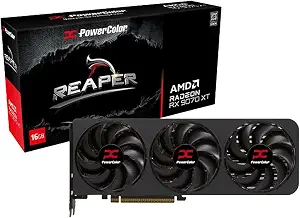
Shopping for an RX 9070 XT during Black Friday calls for more than a glance at a product name or a promotional headline. The PowerColor Reaper AMD Radeon RX 9070 XT 16GB GDDR6 has several concrete details worth matching to your plans: its graphics memory, stated clock speed, display connections, power requirements, and physical dimensions. Those facts can help you decide whether this specific card belongs on your shortlist, but they do not tell you whether a particular offer is worthwhile or whether the card fits your complete system.
Use this guide as a purchase brief: identify what you need from a graphics card, check the listed configuration against your setup, and compare the exact Black Friday listing before buying. No sale price or promotion is assumed here. The useful question is whether the offer and the exact PowerColor variant match the requirements you have already established.
This Reaper card is built around the AMD Radeon RX 9070 XT graphics processor and lists 16 GB of graphics memory. Its stated GPU clock speed is 2400 megahertz. These are identifying specifications to compare with the needs of your intended build, not a guarantee of how a particular game or application will run. If you are choosing a card for a planned system, write down the model and the listed specifications so you can compare the exact configuration against other options without relying on similar-looking product names.
The connection and installation details also make this a specific, checkable choice. The card lists one HDMI 2.1 connection and three DisplayPort 2.1 connections, two 8-pin PCI Express power connectors, and a minimum system power requirement of 750W. Its listed dimensions are 289 * 111 * 41 mm. Those details make it especially useful to shortlist when you want a card with multiple DisplayPort connections, while leaving important checks—such as case clearance and the power arrangement in your own system—to you.
For Black Friday, consider this a fit-first purchase rather than a deal-first decision. Confirm the listing identifies the PowerColor Reaper AMD Radeon RX 9070 XT 16GB GDDR6, then compare the exact offer with your budget and requirements. The recommendation label here reflects the listed display connections, not a performance comparison or a claim that this configuration is better than another card.
Decide what the memory and clock details mean for your shortlist
The 16 GB graphics memory and 2400 megahertz GPU clock speed give you two clear specifications to use when comparing this card with alternatives. Start by considering the tasks you expect the computer to handle and any requirements you have identified for those tasks. Then look for equivalent information on each candidate. Avoid treating one number in isolation as a complete description of expected performance; the supplied specifications do not establish results for a specific game, application, resolution, or system.
These details can also help you avoid comparing unlike configurations by accident. During Black Friday, product pages and search results can place several versions of a graphics card near one another. Read the full model name and check that the memory and clock details describe the variant you mean to buy. If a listing does not make the configuration clear, pause and resolve that uncertainty before comparing its offer. A lower headline price is not useful if you have not confirmed that you are looking at the intended card.
Plan your display connections before the Black Friday rush
The card lists one HDMI 2.1 connection and three DisplayPort 2.1 connections. Count the displays you plan to connect and check which connection types they require. If your setup depends on a particular mix of ports, compare that requirement with the listed arrangement before adding the card to your cart. This is a practical compatibility check, not a claim about which displays or particular configurations the card supports.
Think about your intended arrangement rather than only the number of screens. Check the connection options on your displays and any requirements you have for cables or adapters. The product facts supplied here identify the card’s ports but do not specify cables, adapters, or support details for an individual display. Keep those questions separate from the Black Friday offer itself: an attractive price cannot resolve uncertainty about whether your planned connections suit your setup.
Check the case fit using the listed measurements
The listed card dimensions are 289 * 111 * 41 mm. Compare that exact measurement with the available space in your case and the clearance information for your build. Do not rely on the general appearance of a product image or assume that a card with a familiar model name will match the space available. If you are replacing an existing card, check the actual room in the case rather than treating the old card’s fit as proof that this one will fit.
Make this a deliberate step before shopping intensifies. Check the dimensions against your case documentation or your own measurements, and consider whether other installed components affect the space you can use. The supplied dimensions do not describe every possible clearance issue in a particular computer. If you cannot confirm the fit, hold off on treating a Black Friday deal as a purchase decision until you have the information you need.
Match the stated power requirement to your system
The listing gives a minimum system power requirement of 750W and specifies two 8-pin PCI Express power connectors. Before ordering, check your power supply’s stated capacity and available connectors. These are separate checks: confirming the capacity alone does not tell you whether the required connector arrangement is available, and confirming the connectors alone does not establish that the complete system meets its power needs.
If you are unsure how your existing system is configured, verify it before checkout rather than assuming. Do not treat the stated minimum as a personalized assessment of every component in your computer. The product facts provide a power requirement and connector count; they do not establish what power supply you own or what other components your system contains. During Black Friday, keeping these checks on your list can help you compare offers without rushing past a basic installation question.
Compare the exact Black Friday listing, not just its headline
When you reach the offer page, confirm the full product name and the RX 9070 XT 16GB GDDR6 configuration. Compare the exact item shown with the card you researched, and review the offer details presented at the time you shop. This guide does not establish a current price, discount, stock status, or promotion. Treat any Black Friday claim on a listing as something to assess on that specific page rather than as a reason to skip the model and system checks.
A useful comparison is grounded in your own priorities: the listed memory and clock specification, display connections, power needs, and dimensions. Note which of those details matter to your build, then compare the exact configuration and offer against your budget and alternatives. If the information is unclear, avoid filling gaps with assumptions. A careful pause can be more useful than reacting to a countdown or a broad category headline.
Key specs
Graphics processor
AMD Radeon RX 9070 XT
Graphics memory
16 GB
GPU clock speed
2400 megahertz
Display connectors
1 x HDMI 2.1 , 3 x DisplayPort 2.1
Power connectors
Two 8-pin PCI Express Power Connector
Minimum system power
750W
Card dimensions
289 * 111 * 41 mm
Make your Black Friday choice
The PowerColor Reaper AMD Radeon RX 9070 XT 16GB GDDR6 is a focused option to consider if its listed configuration aligns with your plans, particularly if the three DisplayPort 2.1 connections suit the display arrangement you are checking. Before buying, confirm the exact variant, verify case space and power details, and make sure the listed ports match your needs. For Black Friday, compare the specific offer only after those fit questions are answered; no deal headline can substitute for checking the card against your system.
 Check Price on Amazon